- Digital Marketing
- SEO
- Website Management
What is Hreflang and How to Implement it the Right Way
Learn what hreflang is, why it matters for multilingual and multi-regional websites, and how to implement and test it correctly.
 AuthorRehmat Ullah6 min readUpdated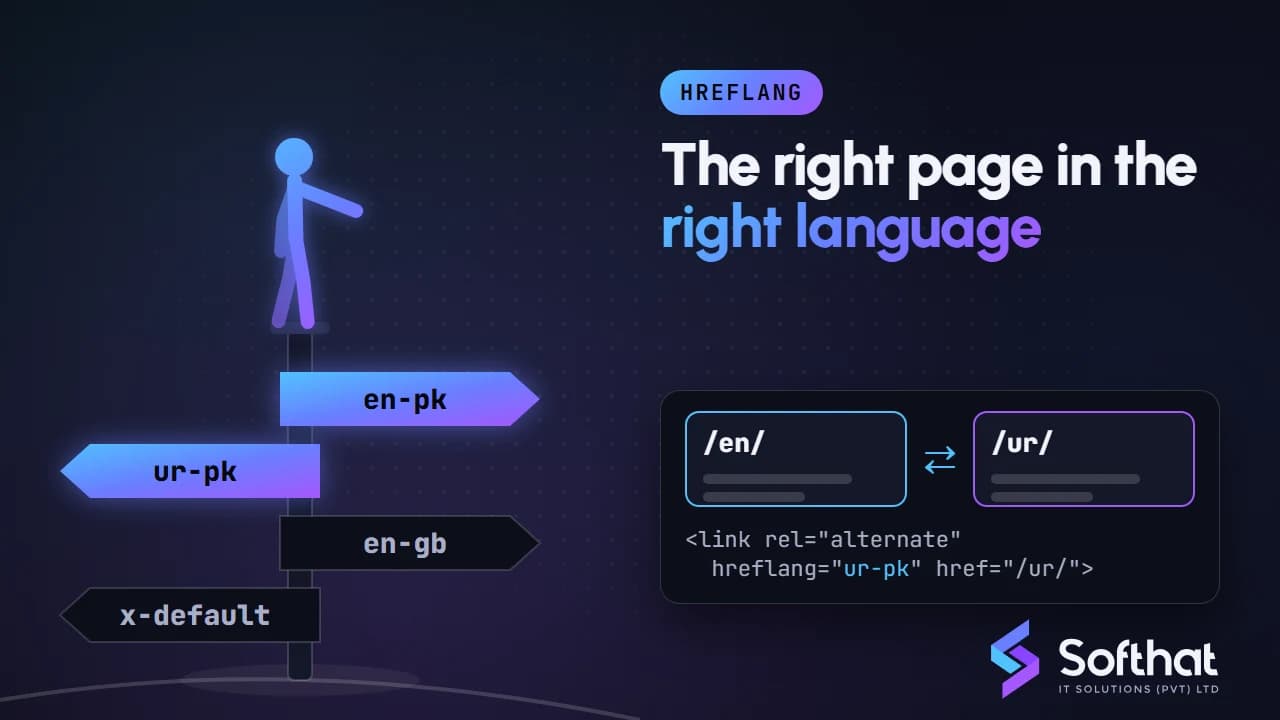
Table of Contents
Many websites serve audiences in more than one language or country. A Pakistani business might have an English site and an Urdu version, or separate pages for customers in Pakistan, the UAE and the UK.
Search engines need help to show each visitor the right version. This is where the hreflang attribute comes in. In this article, we explain what hreflang is, why it matters, how to implement it correctly, and how to test it now that some older tools are gone.
What is Hreflang?
Hreflang is an attribute that tells search engines which language, and optionally which region, a page is written for, and which other URLs are alternate versions of the same content. It helps Google show the most suitable version to users based on their language and location.
For example, if you have an English page for users in Pakistan and an Urdu version of the same page, hreflang tells Google these pages belong together. Google can then show the Urdu page to someone searching in Urdu and the English page to someone searching in English.
One point that often causes confusion: Google says it doesn't use hreflang or the HTML lang attribute to detect a page's language; it uses its own algorithms for that. Hreflang tells Google how your versions relate to each other.
Why is Hreflang Important?
Below are some of the reasons why hreflang is important.
1. Improving User Experience
Hreflang helps send users to the version in their language or for their country, with the right currency, contact details and delivery information. Visitors who land on the right version are more likely to stay and take action.
2. Handling Similar Content Across Regions
An earlier version of this article warned of "penalties" for duplicate content across language versions. That overstated the risk. Translated pages aren't treated as spam, and ordinary duplication doesn't cause a penalty.
The real issue is with near-identical pages in the same language, such as English pages for Pakistan, the UAE and the UK that differ only in phone number or currency. Google may group them and show only one. Hreflang helps Google understand that each version is meant for a different audience, so the right URL can be shown in each country.
3. Boosting International SEO
For businesses targeting several markets, hreflang is a core part of international SEO. It doesn't raise rankings by itself, but it helps the right version appear in each market, so the visibility you earn isn't wasted on the wrong page.
How to Implement Hreflang the Right Way
Implementing hreflang correctly is essential for reaping its benefits. Here’s a step-by-step guide on how to do it:
1. Identify Your Target Languages and Regions
Start by listing the languages and regions your website serves. This determines the hreflang values you need. For instance, if you have English content for Pakistan and the UAE, and Urdu content for Pakistan, you'd use en-PK, en-AE and ur-PK. If a page targets a language everywhere, use just the language code, such as ur.
2. Use the Correct Hreflang Tags
Google accepts three equivalent methods: <link> elements in the HTML <head>, HTTP Link headers (useful for PDFs and other non-HTML files), or <xhtml:link> entries in your XML sitemap. Pick the one that is easiest to maintain for your site; you don't need all three. The basic format of an HTML hreflang tag is:
<link rel="alternate" href="https://www.example.com/ur/" hreflang="ur-PK" />href: The full URL of the alternate version of the page.hreflang: The language code, optionally followed by a region code.
For large sites, the sitemap method is often easier, because you don't have to add many tags to every page template.
3. Implement Self-Referencing Hreflang Tags
Each page should list itself as well as all its alternates. This self-referencing tag confirms which language and region the current page is for.
<link rel="alternate" href="https://www.example.com/en/" hreflang="en-PK" /> 4. Cross-Link All Language Versions
Hreflang links must be bidirectional. Google's documentation says that if page X links to page Y, page Y must link back to page X; otherwise the annotations may be ignored. In practice, every version should carry the same full set of hreflang tags.
5. Include a Default Hreflang Tag
Add an x-default tag for users whose language or region doesn't match any of your versions. This is often a language selector page or your main international page.
<link rel="alternate" href="https://www.example.com/" hreflang="x-default" /> 6. Test Your Implementation
The earlier version of this article pointed to "Google’s Hreflang Tags Testing Tool". Google has never offered a tool with that name. Search Console's International Targeting report, which showed hreflang errors, was also removed on 22 September 2022. Hreflang itself is still supported.
To test hreflang today:
- Site crawlers: Tools such as Screaming Frog SEO Spider, Sitebulb, Ahrefs or Semrush site audits report missing return links, invalid codes and non-canonical targets.
- URL Inspection in Search Console: Check that each version is indexable and that Google has selected it as its own canonical.
- Performance report: Filter by country to confirm that users in each market are landing on the right version.
Common Mistakes to Avoid
- Incorrect Language Codes: Use ISO 639-1 language codes and ISO 3166-1 Alpha 2 region codes. For example, the UK is
en-GB, noten-UK. A region code on its own, such ashreflang="pk", isn't valid. - Missing Self-Referencing Tags: Always include a hreflang tag for the page itself.
- Missing Return Links: If one version doesn't link back, Google may ignore the pair.
- Pointing to Non-Canonical URLs: Hreflang URLs should be the canonical versions that return a 200 status, not redirects,
noindexpages or URLs with tracking parameters. - Canonicalizing All Versions to One Language: Each language version should have a canonical pointing to itself. Pointing the Urdu page's canonical to the English page tells Google to ignore the Urdu page.
- Relying on Automatic Redirects: Forcing visitors (and Googlebot) to a version based on IP address can hide versions from search engines. Let users switch versions with a visible language or country selector.
- Broken Links: Double-check that all URLs in your hreflang tags are correct and lead to the appropriate pages.
Conclusion
Hreflang is a practical tool for multilingual and multi-regional websites. It helps Google show the right language or country version to each user, which improves the experience and makes your international SEO work harder.
Keep the tags complete and reciprocal, use valid codes, point only to canonical URLs, and test with a crawler, since Search Console no longer has a dedicated hreflang report.
Optimize Your Global Reach with Professional Hreflang Implementation
Launching an Urdu version of your site, or targeting customers outside Pakistan? Softhat IT Solutions plans and implements multilingual and international SEO setups. Explore our SEO services, or book a free strategy call to discuss your markets.