- Digital Marketing
- SEO
- Speed Optimization
- Web Development
What are Core Web Vitals & How to Improve Them
Learn what Core Web Vitals (LCP, INP, CLS) are, the current thresholds, why they matter for SEO, and practical ways to improve them on your website.
 AuthorRehmat Ullah6 min readUpdated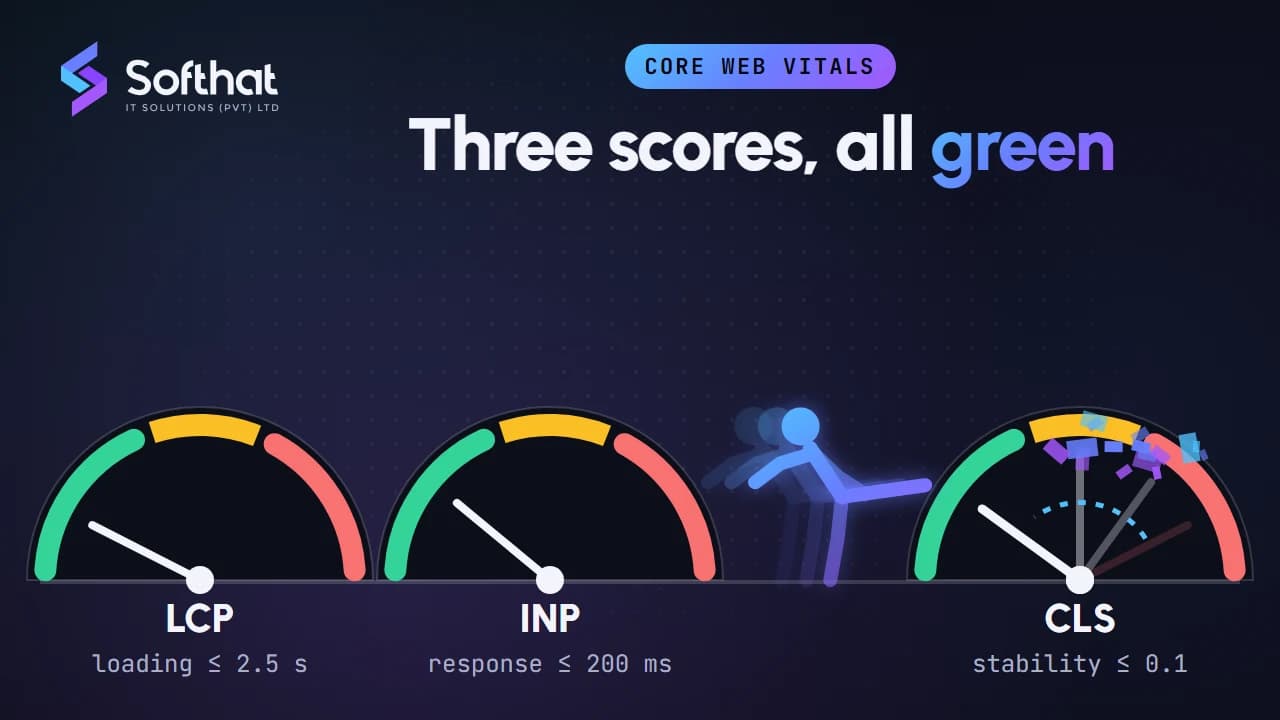
Table of Contents
Google keeps refining how it measures user experience. Core Web Vitals are its clearest, most measurable signals: how fast a page loads, how quickly it responds, and how stable it looks while loading.
For a business in Pakistan, where many visitors browse on mid-range phones and mobile data, these metrics are a practical checklist, not just an SEO detail. In this article, we explain what Core Web Vitals are, what changed recently, why they matter, and how you can improve them.
What are Core Web Vitals?
1. Definition:
- Core Web Vitals are a small set of metrics that Google considers essential to a page's user experience. They focus on three aspects: loading performance, responsiveness (interactivity), and visual stability.
- They are measured with real-user data (called "field data"), and a page's score is taken at the 75th percentile of page loads. In plain terms, three out of four visits should meet the target.
2. Key Metrics:
- Largest Contentful Paint (LCP): Measures loading performance. It marks the moment the largest image or text block in the viewport has rendered. A good LCP is 2.5 seconds or less.
- Interaction to Next Paint (INP): Measures responsiveness. It looks at the delay between a click, tap or key press and the next visual update, across the whole visit. A good INP is 200 milliseconds or less.
- Cumulative Layout Shift (CLS): Measures visual stability. It scores how much visible content moves unexpectedly while the page is in use. A good CLS score is 0.1 or less.
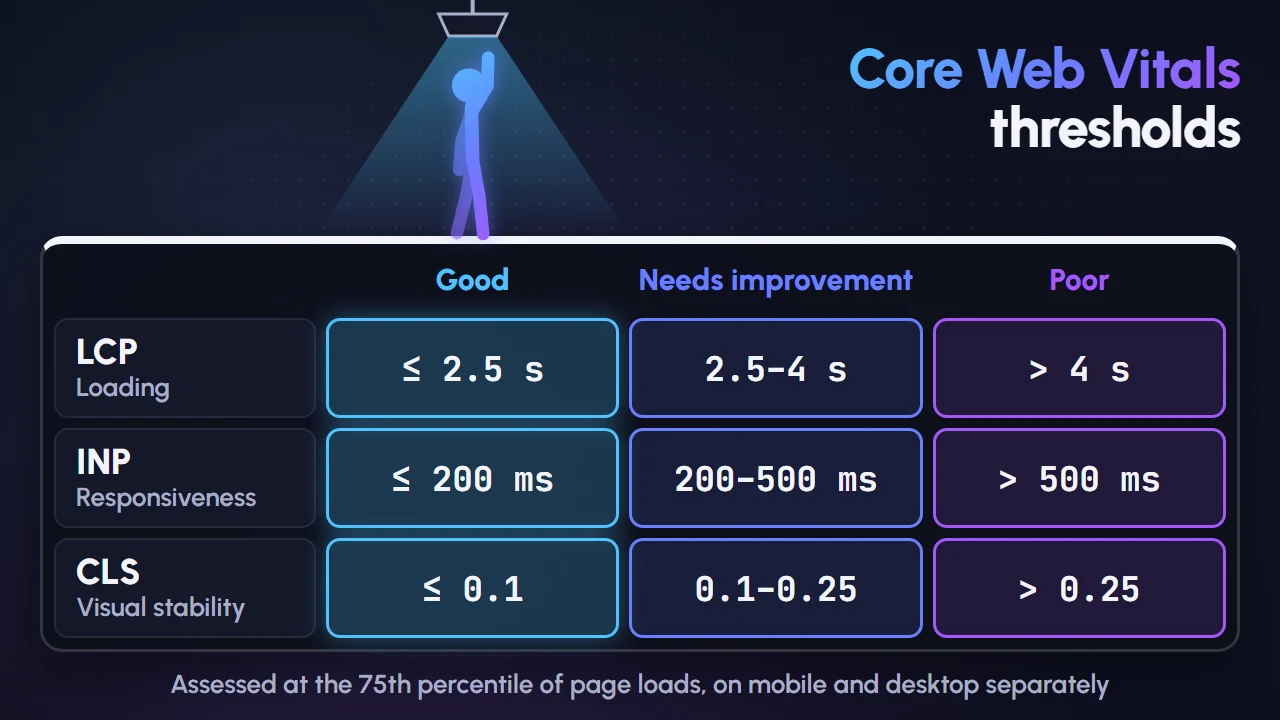
Thresholds at a glance: According to web.dev, a page is "good" when LCP is at most 2.5 s, INP at most 200 ms and CLS at most 0.1. It is "poor" when LCP is above 4 s, INP above 500 ms or CLS above 0.25. Anything in between needs improvement.
INP Replaced FID: What Changed
When this article was first published, the responsiveness metric was First Input Delay (FID). That is no longer the case.
The change: Interaction to Next Paint (INP) officially replaced FID as a Core Web Vital on 12 March 2024. FID is deprecated and no longer part of the Core Web Vitals.
Why it matters: FID only measured the delay before the browser started handling the first interaction. INP is stricter. As web.dev explains, it observes all clicks, taps and keyboard interactions during a visit and reports one of the slowest. It also covers the full journey, from input delay to event processing to the moment the next frame is painted.
What to do: If your site passed FID easily, don't assume it passes INP. Heavy JavaScript, page builders and third-party chat or tracking scripts often show up as slow interactions. Check your INP in Search Console or PageSpeed Insights before planning fixes.
Why Core Web Vitals are Important
1. User Experience:
- Core Web Vitals directly reflect user experience. A site that loads quickly, responds to taps without lag, and doesn't jump around while loading feels trustworthy and easy to use.
2. SEO Ranking:
- Google states that Core Web Vitals are used by its ranking systems. However, it also says good scores don't guarantee top rankings, and the most relevant content can still rank even with a weaker page experience.
- Treat Core Web Vitals as one factor among many. Relevant, helpful content comes first; a fast, stable page helps that content perform.
3. Conversion Rates:
- A smoother experience removes friction from the moments that matter: adding to cart, filling a form, or tapping a WhatsApp button. Slow responses and shifting buttons cause mis-taps and abandoned actions.
How to Improve Core Web Vitals
1. Enhancing Largest Contentful Paint (LCP):
- Optimize Images: Compress images and use modern formats such as WebP or AVIF. Serve responsive sizes so phones don't download desktop-sized images.
- Prioritize the LCP Element: Don't lazy-load the main hero image. Consider
fetchpriority="high"on it so the browser loads it early. - Use a Content Delivery Network (CDN): Distribute content across multiple servers to reduce load times for users based on their geographic location.
- Improve Server Response Time: Use good hosting, server-side caching and a lean theme so the first byte arrives quickly.
- Minimize Render-Blocking Resources: Defer non-critical CSS and JavaScript to speed up the loading of primary content.
2. Improving Interaction to Next Paint (INP):
- Minimize JavaScript: Remove unused scripts and reduce the impact of third-party code such as tag managers, chat widgets and ad scripts.
- Break Up Long Tasks: Split long-running JavaScript into smaller chunks so the main thread can respond to user input in between.
- Use Web Workers: Offload heavy computation to background threads, freeing up the main thread for user interactions.
- Keep Event Handlers Light: Do the minimum work needed to show visual feedback first, then run slower work afterwards.
- Reduce DOM Size: Very large pages take longer to update after each interaction. Simplify layouts built with heavy page builders where you can.
3. Reducing Cumulative Layout Shift (CLS):
- Specify Size Attributes: Always include width and height attributes for images and videos to reserve space before they load.
- Reserve Space for Ads and Embeds: Give banners, maps and social embeds a fixed container so they don't push content down.
- Avoid Inserting Content Above Existing Content: Prevent unexpected layout shifts by not adding new content above existing content unless the user asked for it.
- Use Transformations: Instead of altering the layout directly, use CSS transforms to animate elements smoothly without causing shifts.
- Handle Web Fonts Carefully: Preload key fonts and use sensible fallbacks so text doesn't jump when the custom font arrives.
Tools for Measuring Core Web Vitals
1. Google Search Console:
- The Core Web Vitals report in Google Search Console groups your URLs as good, needs improvement or poor, based on real-world usage data from Chrome users.
2. PageSpeed Insights:
- PageSpeed Insights shows real-user Core Web Vitals data (where enough data exists) alongside lab diagnostics and suggestions to make the page faster.
3. Lighthouse:
- Lighthouse is an open-source, automated tool for improving the quality of web pages. It runs lab audits for performance, accessibility, SEO and more. Note that lab tests can't measure INP directly, because there is no real user interacting; Total Blocking Time is a useful lab proxy.
4. Chrome DevTools Performance Panel:
- The standalone Web Vitals Chrome extension is no longer supported. Its features moved into the Chrome DevTools Performance panel, which now shows live LCP, INP and CLS values as you use a page. It is the best place to find which interaction or element is causing a problem.
Conclusion
Core Web Vitals turn "user experience" into three numbers you can measure and improve: LCP, INP and CLS. INP has replaced FID, so responsiveness now gets a stricter test than before.
Check your real-user data, fix the biggest problems first, and keep monitoring after every redesign or new plugin. A faster, more stable site helps both your visitors and your search visibility.
Transform Your Website’s Performance with Expert SEO Services!
Want your site to pass Core Web Vitals on real phones and real connections? Softhat IT Solutions builds and optimizes fast, stable websites for businesses across Pakistan. Explore our web development services, or book a free strategy call and we will review your LCP, INP and CLS with you.