- SEO
SEO for AI Search: Getting Found in ChatGPT, Gemini and Perplexity
SEO for AI search explained: how ChatGPT, Gemini, Perplexity and Google AI Mode find and cite websites, which bots to allow, and how to track results.
 AuthorRehmat Ullah9 min read
Table of Contents
More of your customers now ask questions in a chat box instead of typing short keywords. They ask ChatGPT to compare solar installers in Lahore, or ask Perplexity which accounting software suits a small trading company.
The answers they get usually cite a handful of websites. If yours is not one of them, that customer may never see your brand. That is why SEO for AI search matters in late 2026.
The good news: you do not need a secret formula. AI search tools still rely on crawling, indexing and good content. This guide shows Pakistani business owners and marketers how these tools find sources, which settings to check, and how to measure what is working.
How AI search engines find and cite websites
Most AI search tools work in a similar way. A crawler visits your pages, the content is stored in an index, and when a user asks a question the system retrieves relevant pages and writes an answer with links.
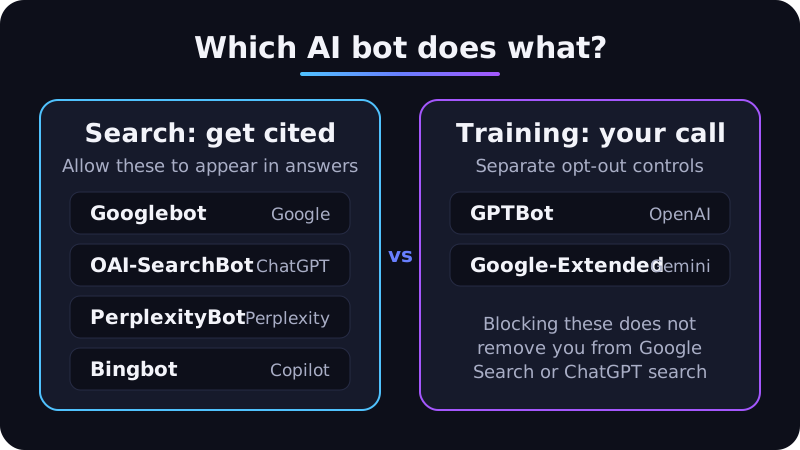
The important detail is that each company runs separate bots for separate jobs. One bot may collect pages for search answers, while another collects content for training AI models. Blocking one does not always block the other.
| Platform | Bot that affects search answers | Training bot (separate) | What the docs say |
|---|---|---|---|
| Google AI Overviews and AI Mode | Googlebot | Google-Extended (a control token, not a separate crawler) | Pages must be indexed and eligible for a snippet (Google Search Central) |
| ChatGPT search | OAI-SearchBot | GPTBot | Sites that block OAI-SearchBot "will not be shown in ChatGPT search answers" (OpenAI) |
| Perplexity | PerplexityBot | None listed; Perplexity says its bots do not train models | PerplexityBot surfaces and links websites in results (Perplexity) |
| Microsoft Copilot and Bing | Bingbot | Not covered here | Copilot citations are reported in Bing Webmaster Tools (Bing) |
Google is clear that "there are no additional requirements to appear in AI Overviews or AI Mode, nor other special optimizations necessary" (Google Search Central). We covered Google's side in detail in Google AI Overviews: What They Mean for Your SEO. This post looks at the wider picture.
Step 1: Let the right AI crawlers reach your site
Start with your robots.txt file (the small text file that tells bots which parts of your site they may crawl). If you are new to it, read what a robots.txt file is first.
A sensible starting robots.txt
Many businesses want to appear in AI answers but prefer not to feed model training. The official docs allow exactly that. OpenAI says "a webmaster can allow OAI-SearchBot in order to appear in search results while disallowing GPTBot" (OpenAI).
User-agent: OAI-SearchBot
Allow: /

User-agent: PerplexityBot
Allow: /

User-agent: GPTBot
Disallow: /

User-agent: Google-Extended
Disallow: /
Only block training bots if that is a deliberate business decision. Allowing them is also a valid choice.
Understand what Google-Extended does
Gemini is where this matters. Google-Extended controls whether content Google crawls may be used to train future Gemini models and for grounding (feeding content from the Google Search index to a model when it answers a prompt). It does not affect Search: Google says it "does not impact a site's inclusion in Google Search nor is it used as a ranking signal" (Google).
So blocking Google-Extended is a trade-off. It keeps your content out of future Gemini training, but because grounding is covered too, it may also limit how your pages are used in Gemini answers. Weigh that before copying the example above.
To keep content out of AI Overviews and AI Mode specifically, Google points to the normal preview controls instead: nosnippet, data-nosnippet, max-snippet or noindex (Google Search Central). Use these carefully, because they also affect your regular search snippets.
Check your firewall and hosting
A surprising number of sites block AI crawlers by accident. Security plugins, CDN bot rules and aggressive rate limits can reject these bots even when robots.txt allows them.
- Check your CDN or firewall dashboard for bot management rules.
- Look at server logs for requests from OAI-SearchBot, PerplexityBot and Bingbot.
- OpenAI and Perplexity publish official IP ranges you can allowlist (OpenAI, Perplexity).
- After a robots.txt change, OpenAI notes it can take about 24 hours for its systems to adjust (OpenAI).
Step 2: Keep your classic SEO foundations strong
AI answers are built on top of search indexes. If a page is slow, blocked, thin or poorly linked, it is less likely to be found by any system.
Google lists the same fundamentals for its AI features as for Search: allow crawling, make content easy to find through internal links, offer a good page experience, put important content in text, and keep structured data consistent with visible content (Google Search Central).
Priorities for most Pakistani business sites:
- Fix indexing issues in Google Search Console and Bing Webmaster Tools.
- Submit an up-to-date XML sitemap to both.
- Make key service and product information visible as HTML text, not only inside images or PDFs.
- Link important pages from your navigation and related articles.
- Keep mobile pages fast, because many of your customers search on their phones.
Bing matters more than many marketers expect, because Copilot draws on it. If you have never verified your site in Bing Webmaster Tools, do it this week.
Step 3: Write content that AI answers can quote
AI systems pull short, specific passages to support their answers. Content that is vague or padded gives them little to work with.
Answer the question early
Put a direct, two or three sentence answer near the top of each section, then add detail. A heading like "How long does company registration take with SECP?" followed by a clear answer is easier to cite than a long story.
Be specific and original
Generic advice exists on thousands of sites. What only you can offer is first-hand detail: your process, your pricing model, the questions customers in Karachi or Mardan actually ask, and examples from your own work.
Google's guidance asks whether content provides "original information, reporting, research, or analysis" and demonstrates first-hand expertise (Google Search Central). That same quality makes a page worth citing.
Structure for scanning
- Use descriptive H2 and H3 headings that match real questions.
- Use tables for comparisons, pricing models and specifications.
- Use numbered steps for processes.
- Add an FAQ section for the follow-up questions people ask.
- Keep facts current and show an "updated" date when you revise a page.
Do not mass-produce AI pages
It is tempting to publish hundreds of AI-written pages to "cover" every question. Google warns that generating many pages without adding value "may violate Google's spam policy on scaled content abuse" (Google Search Central). Use AI to help research and edit, then add your own expertise.
Step 4: Make your brand easy to identify
When someone asks an AI tool for "a reliable web developer in Islamabad", the system has to understand which businesses exist, what they do and where they operate. Clear, consistent information helps.
- About and contact pages: state your legal name, city, services and contact details plainly.
- Author information: show who wrote expert content and why they are qualified.
- Structured data: add Organization or LocalBusiness markup that matches what the page shows. Our guide on schema markup explains the basics.
- Google Business Profile: keep name, address, phone and hours accurate.
- Consistent listings: use the same business details on directories, social profiles and marketplaces.
AI answers also cite third-party pages such as reviews, comparisons and news coverage. Earning genuine mentions on reputable Pakistani and industry sites supports both classic SEO and AI visibility, but avoid paid link schemes.
What about llms.txt?
llms.txt is a proposed file that lists a site's key pages for large language models. It gets a lot of attention, so be careful with the claims around it.
Google's documentation says you do not need to create "new machine readable files, AI text files, or markup" to appear in its AI features (Google Search Central). None of the crawler documentation we reviewed from OpenAI or Perplexity asks site owners to publish one.
Adding the file is low effort and unlikely to cause harm. Just do not treat it as a ranking lever or spend budget on it before the basics above are done.
How to measure AI search visibility
Measurement is still imperfect, but you are not flying blind.
| Where | What you can see |
|---|---|
| Google Search Console | Clicks and impressions from AI Overviews and AI Mode are included in the Performance report under the "Web" search type, not shown separately (Google Search Central) |
| Bing Webmaster Tools | The AI Performance report shows citations of your pages in Copilot and Bing AI experiences, plus grounding queries (Bing) |
| Google Analytics 4 | Referral sessions from AI tools, such as chatgpt.com and perplexity.ai, in the Traffic acquisition report |
| Manual checks | A fixed list of 20 to 30 real customer questions, asked monthly in each tool, noting whether you are cited |
Record your manual checks in a simple spreadsheet. AI answers vary between sessions, so look for trends over several months rather than reacting to one result.
Also track what happens after the click. Visitors from AI answers often arrive with a clear intent, so compare their enquiry and conversion rates with other channels.
Frequently asked questions
Is SEO for AI search different from normal SEO?
Mostly no. The foundations are the same: crawlable pages, helpful content and a trustworthy brand. The main extra steps are checking AI crawler access, writing more quotable answers and measuring citations.
Will blocking GPTBot remove my site from ChatGPT?
Not from ChatGPT search. OpenAI says GPTBot relates to model training, while OAI-SearchBot controls whether your site can appear in ChatGPT search answers (OpenAI).
Do I need special schema to appear in AI Overviews?
No. Google says there is "no special schema.org structured data" you need to add (Google Search Central). Normal, accurate structured data still helps Google understand your pages.
How long before I see results?
It depends on how often your site is crawled and how competitive your topics are. Access fixes can take effect within days, while content and brand improvements usually take months, as with classic SEO.
Get your business cited in AI answers
AI search rewards the same things good SEO always has: clear access, useful content and a brand that is easy to trust. The difference is that the gaps now show up faster, because a chat answer only names a few sources.
If you want a team to audit your crawler settings, content and tracking, our SEO services cover both classic and AI search. Book a free strategy call and we will show you where your site stands today.