- AI & Automation
n8n Workflow Automation: A Beginner's Guide for Businesses
Learn n8n workflow automation from scratch: triggers, nodes, AI agents, Cloud vs self-hosted, licensing and five practical workflows for Pakistani businesses.
 AuthorRehmat Ullah7 min read
Table of Contents
Every business has tasks that repeat all day: copying leads from a form into a sheet, forwarding orders, sending reminders, chasing unpaid invoices. None of these need a person's judgement, yet they eat hours of staff time.
n8n workflow automation is one of the most flexible ways to hand that work to software. This beginner's guide explains how n8n works, what it costs to run, how its licence affects you, and which workflows are worth building first.
What is n8n?
n8n (pronounced "n-eight-n") is a workflow automation platform. You connect apps and services on a visual canvas, and n8n moves data between them automatically.
It sits in the same family as Zapier and Make, with two differences that matter to many businesses:
- You can self-host it on your own server, keeping data under your control.
- You can go deeper when needed, with custom code, direct API calls and AI agents inside the same workflow.
n8n's documentation groups its built-in nodes into core nodes, app nodes, trigger nodes and cluster nodes. You do not need to memorise these. The next section explains the parts you will actually use.
How n8n works: triggers, nodes and executions
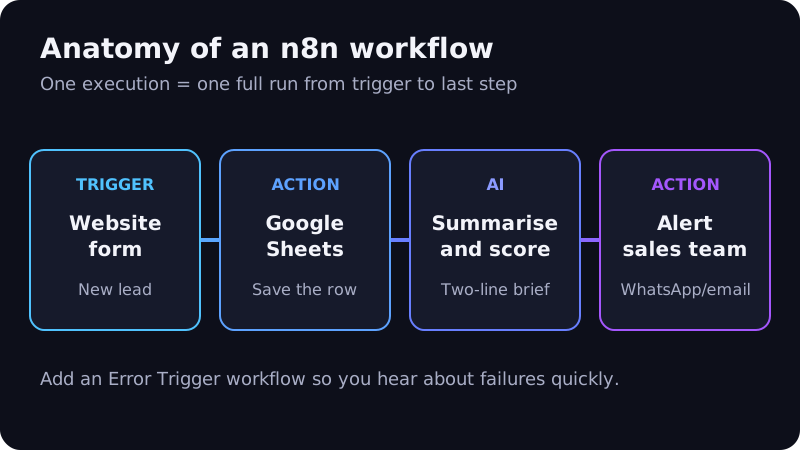
Every n8n workflow is a chain of steps called nodes.
- Trigger node: what starts the workflow. For example, a new form submission, a new order, an incoming webhook (a message one app sends to another when something happens) or a schedule such as "every morning at 9".
- Action nodes: what happens next. Add a row to Google Sheets, send an email, create a CRM contact, post a Slack message.
- Logic nodes: decide the path. "If order value is above PKR 50,000, alert the manager."
- AI nodes: summarise, classify, extract or reply using a language model.
Each time a workflow runs from start to finish, that is one execution. n8n keeps a record of executions, which helps you see what happened and fix errors.
Two nodes worth knowing early
- HTTP Request: connects to almost any service that has an API, even without a dedicated n8n node.
- Code: runs a short JavaScript or Python snippet when the built-in options are not enough.
n8n Cloud vs self-hosted: which should you choose?
n8n offers three main paths: a managed n8n Cloud, a free self-hosted Community edition and paid self-hosted Business or Enterprise editions.
| n8n Cloud | Self-hosted Community | Self-hosted Business/Enterprise | |
|---|---|---|---|
| Who runs the server | n8n | You | You |
| Software cost | Monthly plan | Free | Paid licence key |
| Technical skill needed | Low | Server, Docker, backups, updates | Same as Community |
| Advanced team features | By plan | Limited | Included by plan |
| Best for | Teams without in-house DevOps | Developers, internal automation, tight budgets | Larger teams needing SSO, environments, Git |
n8n Cloud
Cloud plans are billed on monthly workflow executions, where one execution is one full workflow run regardless of how many steps it has. When we checked in September 2026, the published Cloud plans started from the Starter tier at €20 per month billed annually, with a 14-day free trial. Prices change, so confirm on the pricing page.
Self-hosted Community edition
The self-hosted Community edition is free and includes "almost the complete feature set". The docs are clear that self-hosting needs technical expertise and that you must manage the infrastructure yourself.
Features not included in Community edition include SSO, projects, sharing of workflows and credentials, environments, external secrets, log streaming and Git-based version control.
Self-hosting does not mean zero cost. Budget for a server (local or international cloud), backups, security updates and someone to fix issues when a workflow breaks at night.
Understanding the n8n licence (Sustainable Use License)
n8n is not open source in the traditional sense. It uses the Sustainable Use License, which n8n describes as "fair-code".
According to the licence text, you may use the software "only for your own internal business purposes or for non-commercial or personal use". Files marked .ee are covered by a separate n8n Enterprise License.
What this means in practice:
- Usually fine: automating your own company's sales, support, HR or accounting processes.
- Usually fine: an agency building workflows for a client who runs them on the client's own n8n.
- Needs care: selling a product where n8n itself is what customers pay to access, such as hosting n8n for others or embedding it in your SaaS.
If your business model involves offering n8n to third parties, read the licence carefully and contact n8n about commercial terms. This is general information, not legal advice.
AI agents inside n8n
n8n has moved quickly into AI. Its docs describe how you can connect LLM providers such as OpenAI, Anthropic and Google, add tools and memory, and combine several models in one workflow.
According to n8n's agent documentation, agents can:
- Use built-in n8n integrations, such as Slack or Google Sheets, as tools.
- Call other workflows and external tools through MCP (Model Context Protocol, a standard way for AI to connect to tools).
- Keep session memory of the current conversation.
- Pause for human approval before running a sensitive tool.
That last feature matters. It lets you give an AI agent useful abilities while a person still approves anything risky. For a wider view of where agents help and where they do not, read our guide to AI agents for small businesses.
5 practical n8n workflows for Pakistani businesses
Start with workflows that save time every day and are easy to check.
1. Lead capture and instant alert
Website form or Facebook lead ad → save to Google Sheets or CRM → AI writes a two-line summary → WhatsApp or email alert to the sales team. Fast follow-up is the heart of lead generation.
2. Order notifications for online stores
New WooCommerce or Shopify order → message the customer → notify the warehouse → add to a daily dispatch sheet. With the WhatsApp Business API, confirmations can go out on the channel customers actually read.
3. Payment and invoice reminders
Every morning → check unpaid invoices → send a polite reminder at 3, 7 and 14 days → flag anything older to the accounts team.
4. Support message triage
New email or chat → AI classifies it (sales, complaint, delivery, other) and detects urgency → route to the right person → log in a sheet for weekly review.
5. Weekly reporting
Every Monday → pull numbers from your store, ads and CRM → AI writes a short plain-English summary → email it to management.
Build your first n8n workflow in 7 steps
- Map the manual process on paper: every step, every app, every person involved.
- Pick Cloud or self-hosted. If nobody on your team manages servers, start with Cloud.
- Connect credentials for the apps you need (Google, email, CRM).
- Add the trigger and run it once with test data.
- Add actions one at a time, testing after each node.
- Add error handling. n8n's Error Trigger node can start a separate workflow that alerts you when something fails.
- Activate and monitor the execution list daily for the first week.
Common beginner mistakes
- Automating a process that is still unclear or changing every week.
- Building one huge workflow instead of several small ones.
- Storing passwords in plain text instead of n8n credentials.
- Skipping error alerts, so failures go unnoticed for days.
- Letting AI send messages to customers without testing edge cases.
Frequently asked questions
Is n8n free?
The self-hosted Community edition is free to use under the Sustainable Use License. You still pay for hosting and maintenance. n8n Cloud is a paid, managed service with a free trial.
Do I need to know coding to use n8n?
No, for most simple workflows. The visual editor covers common tasks. Basic knowledge of APIs, JSON (a common data format) and a little JavaScript helps a lot as workflows grow.
Is n8n better than Zapier?
It depends on your team. n8n gives more control, self-hosting and deeper customisation. Fully hosted tools can be quicker for non-technical teams that need only simple automations.
Can n8n work with WhatsApp?
Yes. n8n can connect to Meta's WhatsApp Cloud API to send and receive messages, subject to Meta's templates, opt-in rules and pricing.
Put n8n workflow automation to work
n8n workflow automation gives Pakistani businesses a practical way to cut repetitive work, respond to customers faster and add AI where it helps, with the option to keep data on their own servers.
Softhat designs and maintains n8n automations as part of our AI automation service: lead flows, order updates, AI triage and reporting. Book a free strategy call and we will map which of your tasks to automate first.