- AI & Automation
- WhatsApp Marketing
WhatsApp Business API for Pakistani Businesses: A Practical Guide
How the WhatsApp Business API works for Pakistani businesses: per-message pricing, the October 2026 changes, Cloud API vs BSPs, opt-in and messaging limits.
 AuthorRehmat Ullah8 min read
Table of Contents
Your customers in Pakistan already live on WhatsApp. They ask for prices there, share payment screenshots there and expect replies within minutes. Once a single phone and the free WhatsApp Business app can no longer keep up, the WhatsApp Business API is the next step.
This guide explains what the API is, how Meta charges for it, what changes on 1 October 2026, and how to set it up without getting your number restricted.
WhatsApp Business app vs the WhatsApp Business API
Meta offers two separate products for businesses. They solve different problems.
| WhatsApp Business app | WhatsApp Business Platform (API) | |
|---|---|---|
| Who uses it | Shops, freelancers, small teams | Businesses with higher volume or automation needs |
| How you use it | Phone app, WhatsApp Web | Through software: a CRM, chatbot or helpdesk |
| Multiple agents | Limited | Many agents on one number via a shared inbox |
| Automation | Quick replies, greeting and away messages | Chatbots, AI assistants, order and payment alerts |
| Cost | Free app | Charged per template message (details below) |
The API has no screen of its own. You connect it to a tool, such as a chatbot, a CRM (customer relationship management system) or your ecommerce store, and that tool sends and receives messages for you.
Signs you have outgrown the app:
- Several staff members share one phone to answer customers.
- Leads from ads wait hours for a first reply.
- You send order confirmations or delivery updates by hand.
- You want a bot to answer common questions at night.
How WhatsApp Business API pricing works
Meta moved from conversation-based pricing to per-message pricing on 1 July 2025. Under this model, Meta charges when a template message is delivered, and the rate depends on the template category and the recipient's country calling code.
The three template categories
A template is a pre-approved message format you use to start or restart a chat. Each template belongs to one category:
- Marketing: offers, product launches, abandoned-cart reminders, event invites. Always charged.
- Utility: order confirmations, delivery updates, payment receipts, appointment reminders. Charged when sent outside the customer service window.
- Authentication: one-time passcodes (OTPs) for logins and account verification.
The customer service window
When a customer messages you, a 24-hour customer service window opens. Inside that window you can reply freely with normal text, images and documents, without needing a template.
There is also a free entry point window. If a customer reaches you through a Click to WhatsApp ad or a Facebook Page call-to-action button and you reply within 24 hours, a 72-hour window opens in which all messages are free.
Volume tiers and Pakistan rates
Businesses that send more utility and authentication messages each month can unlock lower rates through volume tiers that reset monthly. Pakistan is priced as its own market (country code +92) on Meta's rate card.
Rates change from time to time. For example, Meta applied higher utility and authentication rates for Pakistan from 1 April 2026. Always check the current rate card on Meta's pricing page before budgeting, and ask your provider whether they add a markup.
What changes on 1 October 2026
This is the biggest pricing change since per-message billing began, and it affects almost every business that uses the API for customer support.
According to Meta's non-template message pricing page:
- Service messages will be charged. Free-form replies inside the 24-hour window, which have been free since November 2024, will be charged per message.
- Utility templates inside the window will be charged. These have been free since 1 July 2025.
- Rates match utility and authentication rates for each market, with no volume tiers for service messages.
There is also a monthly free tier and a payment-method deadline of 30 September 2026, both covered in WhatsApp service messages become paid on 1 October 2026.
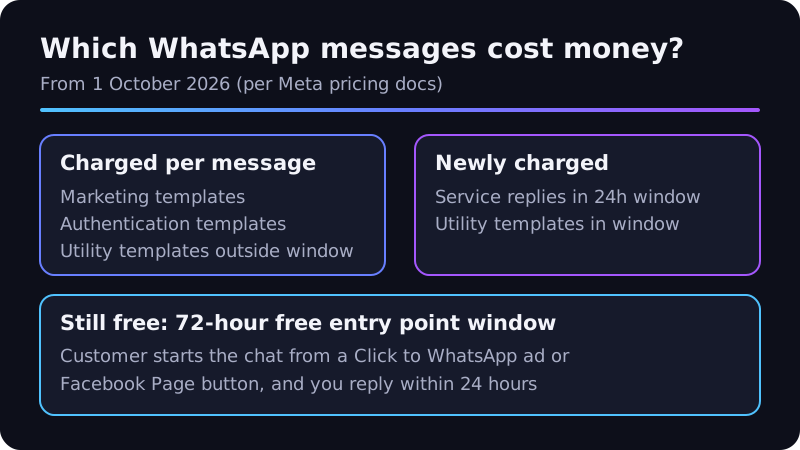
What this means for your budget
- Short, useful replies matter more. Five separate one-line messages now cost five times one clear message.
- Bots should resolve, not ramble. A well-designed chatbot answers in fewer messages.
- Click to WhatsApp ads become more attractive, because the 72-hour free window still applies.
- Track cost per resolved chat, not just cost per message.
Cloud API or a Business Solution Provider (BSP)?
There are two ways to get access to the API.
Option 1: Meta's Cloud API directly
The Cloud API is hosted by Meta. The older On-Premises API is gone: its final client version expired on 23 October 2025, and new numbers can only be registered on Cloud API.
Going direct suits businesses with developers who can build and maintain the integration. You pay Meta's rates without a middleman, but you build the inbox, bot logic, reporting and template management yourself.
Option 2: A Business Solution Provider
A BSP (a Meta partner that resells access and provides software on top) gives you a ready-made inbox, chatbot builder and broadcast tools.
| Factor | Cloud API direct | Through a BSP |
|---|---|---|
| Setup speed | Slower, needs developers | Faster, guided onboarding |
| Monthly platform fee | None from Meta | Usually yes |
| Message cost | Meta rates | Meta rates, sometimes plus a markup |
| Custom workflows | Fully flexible | Limited to the BSP's features |
| Support | Developer documentation | Provider's support team |
A third route is a custom build: a developer or agency connects the Cloud API to your own systems, such as your website, stock database or CRM. This is often the best fit when you need a bot that checks real order status or books real appointment slots.
How to set up the WhatsApp Business API in Pakistan
- Choose a phone number. Use a number that can receive an SMS or voice call for verification. A number already active on the WhatsApp app must be removed from the app first, or migrated by your provider.
- Create or use a Meta business portfolio in Meta Business Suite.
- Complete business verification. Upload documents that match your registered business name. Verification also helps you reach higher messaging limits.
- Set a display name that clearly matches your brand. Meta reviews display names.
- Connect to Cloud API or a BSP and add a payment method.
- Create your first templates and submit them for approval, one per use case.
- Build opt-in points on your website, checkout, forms and in-store.
- Test with your team before sending to customers.
Opt-in, quality and messaging limits
Getting a number restricted is the most common and most avoidable problem.
Collect clear opt-in
WhatsApp's rules say businesses may only message people who have given their number and opted in. Meta's guidance on getting opt-in asks you to state clearly that the person is opting in to WhatsApp messages and name your business.
Good opt-in points include a checkbox at checkout, a "Get updates on WhatsApp" button on your website or a customer messaging you first. A phone number collected for delivery is not permission to send promotions.
Understand messaging limits
Messaging limits cap how many unique customers you can contact outside the service window. Per Meta's messaging limits documentation:
- New business portfolios start at 250 unique recipients in a rolling 24-hour period.
- The next tiers are 2,000, 10,000, 100,000 and unlimited.
- Limits are shared by all phone numbers in the same business portfolio.
- Business verification is one path to the 2,000 tier. Higher tiers depend on sustained quality.
Protect your quality rating
If many recipients block or report you, your quality rating drops and Meta can restrict sending. Keep messages relevant, respect opt-outs quickly and avoid blasting your whole contact list with the same offer.
AI chatbots on WhatsApp: what is allowed
Meta updated its WhatsApp Business Solution terms to bar general-purpose AI chatbots from the platform from 15 January 2026. Businesses can still use AI for a clear business purpose, such as customer support, bookings and order tracking.
In practice, a bot that answers questions about your products, takes orders or books appointments fits the rules. A bot that acts as an open-ended "ask me anything" assistant does not. Our guide on lead generation covers how a focused bot fits into your wider funnel.
Frequently asked questions
Is the WhatsApp Business API free in Pakistan?
Access to Cloud API has no setup fee from Meta, but messages are charged by category and market. From 1 October 2026, most service replies are also charged. BSPs and developers add their own fees.
Can I use my existing WhatsApp number?
Yes, in most cases. The number must be removed from the WhatsApp or WhatsApp Business app, or migrated through a supported process, before you register it on the API.
Can I send bulk promotions to all my contacts?
Only to people who opted in, using approved marketing templates, within your messaging limit. Sending to cold lists risks blocks, reports and restrictions. Pair WhatsApp with channels like email marketing for broader reach.
How long does setup take?
It depends on how quickly business verification and template approvals go through, and on how complex your bot or integration is. A simple inbox can go live much faster than a bot connected to your stock or booking system.
Get your WhatsApp Business API working for you
The WhatsApp Business API lets a Pakistani business reply faster, automate routine updates and scale support without adding phones. The October 2026 pricing change makes good design more important: clear templates, focused bots and clean opt-in lists keep costs predictable.
Softhat builds WhatsApp bots & AI automation for businesses across Pakistan, from Karachi to KPK. We handle setup, templates, opt-in flows and bots that connect to your real systems. Book a free strategy call to plan yours.