
- Content Writing
- Digital Marketing
- SEO
What is Duplicate Content & Does Duplicate Content Hurt SEO?
Learn what duplicate content is, whether Google penalizes it, how it affects SEO, and how to fix it with canonicals, redirects and consistent URLs.
 AuthorRehmat Ullah5 min readUpdated
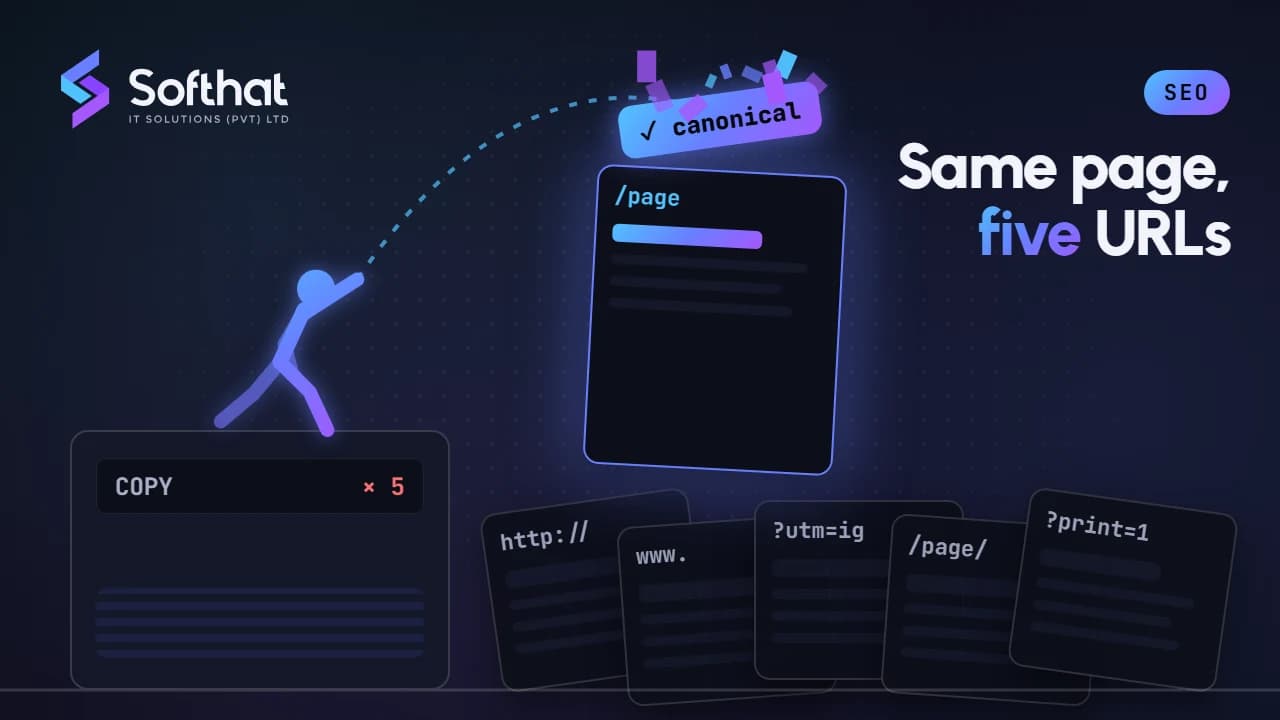
Table of Contents
Duplicate content is one of the most misunderstood topics in SEO. Many site owners worry about a "duplicate content penalty" that, for normal websites, doesn't exist.
That doesn't mean duplication is harmless. In this article, we explain what duplicate content is, how it really affects SEO, when it does become a problem, and what steps you can take to avoid and fix it.
What is Duplicate Content?
1. Definition:
- Duplicate content is content that appears at more than one URL, either within a single website or across different websites. It can be identical or substantially similar.
2. Types of Duplicate Content:
- Internal Duplicate Content: The same content appears at multiple URLs on the same site. Common causes include HTTP vs. HTTPS, www vs. non-www, trailing slash variations, tracking parameters (
?utm_source=), session IDs, printer-friendly pages, and product pages reachable through several categories. - External Duplicate Content: Content that appears on other websites. This can happen legitimately through syndication (such as a press release republished by news sites), through manufacturer product descriptions used by many online stores, or through scraping and plagiarism.
3. What Isn't a Duplicate Problem:
- Short repeated elements such as headers, footers, and legal disclaimers are normal. Paginated pages (page 2, page 3 of a category) are separate pages, not duplicates of page 1. Properly translated pages are not duplicates either.
Does Duplicate Content Hurt SEO?
Ordinary, non-deceptive duplication doesn't lead to a penalty. According to Google's guide to consolidating duplicate URLs, Google groups duplicate pages and picks one canonical version to show. Google even notes that specifying a canonical is optional, and most sites will do fine without it. The effects you should care about are these:
1. Google May Pick the Wrong Version: When several URLs show the same content, Google chooses which one to show. It may not be the URL you want, such as a version with tracking parameters instead of your clean page.
2. Split Signals: Links and other signals can be spread across several versions of the same page instead of being consolidated on one. Clear canonicalization helps Google combine them.
3. Wasted Crawling on Large Sites: On very large sites, such as online stores with thousands of filter combinations, crawling many duplicate URLs can slow the discovery of new pages. For most small and medium sites, this isn't a concern; see our guide to crawl budget.
4. When It Becomes Spam: Deliberately copying other sites' content to manipulate rankings is different. Google's spam policies cover scraped content, such as republishing content from other sites without adding original value. Sites that do this can rank lower or be removed from search results.
Duplicate Content in Everyday Situations
- Online stores: Many stores in Pakistan use the same manufacturer descriptions as other sellers, including large marketplaces like Daraz. This isn't a penalty, but it gives Google little reason to show your page over theirs. Add your own details: sizing advice, local delivery and payment options (such as cash on delivery, JazzCash or Easypaisa, if you offer them), photos and real FAQs.
- Service area pages: Creating near-identical pages for every city with only the city name changed adds little value. Write location pages only where you have something genuinely specific to say.
- Syndicated articles: If a partner republishes your article, ask them to add
noindexto their copy and link back to your original. - AI-assisted content: Content generated from the same prompts and sources can end up very similar to what's already ranking. Add original experience, examples and data so your page offers something new.
How to Avoid and Fix Duplicate Content
1. Canonicalization: Use the rel="canonical" tag to indicate the preferred version of a page, and add a self-referencing canonical to each page. Learn more in our guide to canonical URLs.
2. 301 Redirects: Implement 301 redirects when a duplicate version doesn't need to exist, such as HTTP, non-www or old URLs. Redirects are the strongest canonicalization signal.
3. Consistent URL Structures: Link internally to one version of each URL, include only canonical URLs in your sitemap, and settle on one format for protocol, hostname and trailing slashes.
4. Unique Content Creation: Write unique, useful content for each important page. Where two pages cover the same topic, consider merging them into one stronger page.
5. Handle Pagination Correctly: An earlier version of this article suggested using noindex on paginated pages. That conflicts with Google's guidance. Google's pagination documentation says to give each page in a sequence its own URL and its own canonical, and not to point them all at page 1. Link between the pages with normal <a href> links so Google can find the products or posts on later pages.
6. Use Noindex Only Where It Fits: noindex is useful for pages that shouldn't appear in search at all, such as internal search results or some filtered and sorted variations. Google recommends against using noindex to choose a canonical among duplicates on your own site; use redirects or canonical tags for that. Don't block duplicates in robots.txt either, because Google then can't see their canonical tags.
7. Monitoring and Auditing: In Google Search Console, the Page indexing report lists pages such as "Duplicate without user-selected canonical" and "Duplicate, Google chose different canonical than user". Use URL Inspection to see which canonical Google selected. Tools like Siteliner (for internal duplication) and Copyscape (for copies on other sites) help with content audits.
Conclusion on What is Duplicate Content & Does Duplicate Content Hurt SEO
Duplicate content rarely causes a penalty, but it can make Google show the wrong URL, split your signals, and give searchers no reason to choose your page. Deliberate copying to manipulate rankings is a different matter and falls under Google's spam policies.
Use consistent URLs, redirects and self-referencing canonicals, give paginated pages their own canonicals, and focus on original, useful content for the pages that matter most.
Ready to Eliminate Duplicate Content and Boost Your SEO?
Seeing duplicate or "Google chose different canonical" warnings in Search Console? Softhat IT Solutions fixes technical duplication and helps create original content that stands out in search.
Explore our SEO services, or book a free strategy call to review your site.