

- SEO
- Web Development
Website Redesign Checklist: Relaunch Without Losing Traffic
A step-by-step website redesign checklist to protect your SEO: benchmark, map 301 redirects, test staging, launch safely and monitor Search Console.
 AuthorRehmat Ullah8 min read
Table of Contents
A new website should bring in more enquiries, not fewer. Yet many businesses relaunch a beautiful redesign and then watch their Google traffic drop for months.
The cause is rarely the design itself. It is usually changed URLs without redirects, missing pages or a staging setting left switched on. This website redesign checklist walks you through each stage, from planning to the weeks after launch, based on Google's own guidance for site moves.
Why redesigns lose traffic
Google ranks individual URLs. When those URLs change or disappear, Google has to find the new versions, recrawl them and reassign signals such as links.
Google's documentation says that for medium-sized websites, "it can take a few weeks or more" for Google to start showing new URLs instead of old ones, and larger sites take longer (Google Search Central). Some ranking movement during that time is normal.
What is not normal is a lasting drop. That usually comes from avoidable mistakes:
- Old URLs returning 404 errors instead of redirecting.
- Many old pages redirected to the home page.
- A
noindextag or robots.txt block copied from staging to the live site. - Removed content that used to attract search traffic.
- A slower site, or tracking codes that no longer fire.
The good news is that every item on that list can be caught with a checklist.
Change one thing at a time where you can
Google recommends planning changes "one after the other, not everything at the same time". Its example is a business that wants a new domain, a new CMS and a new layout: move the domain first, then change the layout (Google Search Central).
This matters because if traffic drops after five simultaneous changes, you cannot tell which one caused it. If budget or timelines force a single launch, the rest of this checklist becomes even more important.
Google also suggests timing a move for a quieter period if your traffic is seasonal. For many Pakistani retailers, that means avoiding the weeks before Eid, the 11.11 sales or back-to-school season.
Stage 1: Benchmark before you touch anything
You cannot prove a relaunch worked without a clear "before" picture. Record these at least a few weeks before launch:
- Organic traffic and conversions from Google Analytics, including form submissions, calls and WhatsApp clicks.
- Search Console performance: clicks, impressions and top queries for your key pages.
- Top landing pages by organic traffic.
- Pages with backlinks, from the Links report in Search Console.
- Indexed page count from the Page indexing report.
- Core Web Vitals for mobile and desktop.
- A full crawl of the current site with a crawler tool, saved as a spreadsheet.
Export and save the data. Search Console only keeps a limited history, and you will want to compare later.
Stage 2: Build your URL and content map
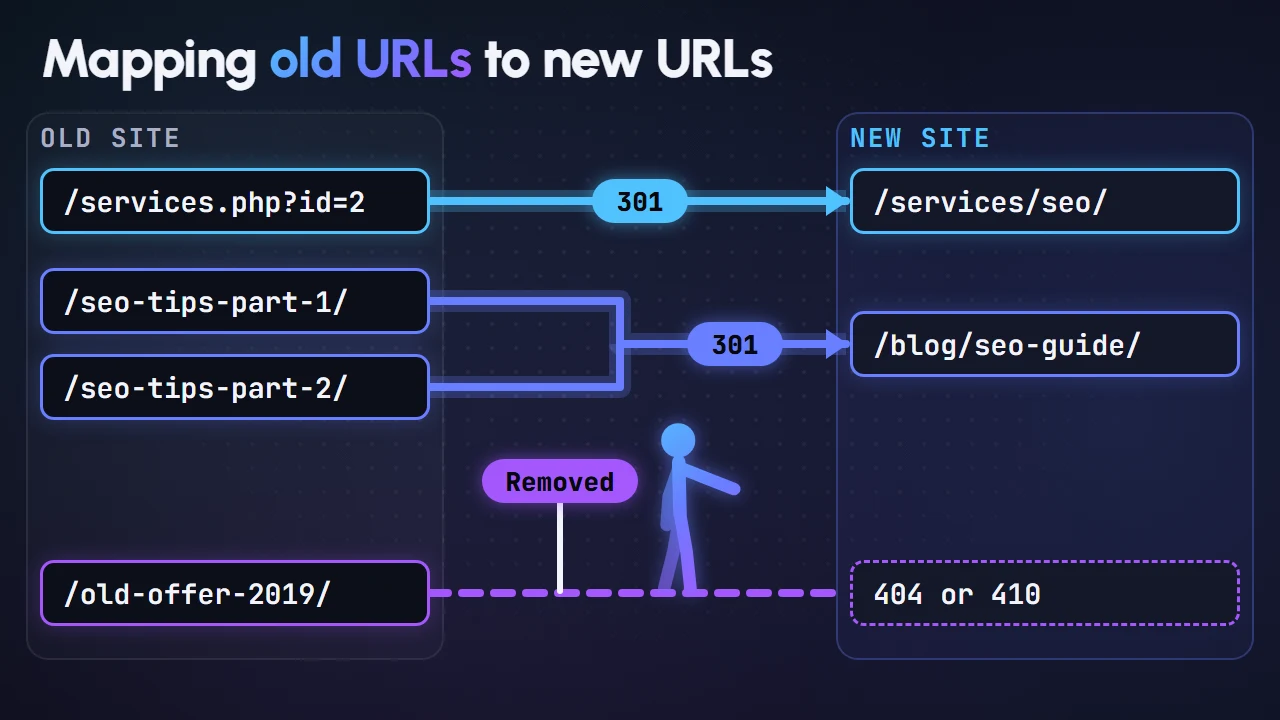
This is the most important part of any redesign that changes URLs. Google says it is important to map your old site's URLs to the URLs for the new site (Google Search Central).
Find every URL that matters
Google suggests starting with your important URLs and gathering them from (Google Search Central):
- Your XML sitemaps.
- Server logs or analytics for your highest-traffic pages.
- The Links report in Search Console for pages with internal and external links.
- Your CMS, which can usually list every URL.
Include images, PDFs and videos. Google notes that files such as downloads may already get traffic from Search or links, so they need to move properly too.
Decide what happens to each URL
For every old URL, choose one outcome:
| Old page situation | Action |
|---|---|
| Same content, same URL | Keep the URL. No redirect needed. |
| Same content, new URL | 301 redirect to the new URL |
| Several pages merged into one | 301 redirect each to the merged page |
| Content removed with no replacement | Return 404 or 410 |
Be careful with removals. Pages that bring organic traffic or have backlinks are worth keeping or merging, not deleting.
Google warns against redirecting many old URLs to one irrelevant destination, such as the home page, because it "might be treated as a soft 404 error" (Google Search Central).
Stage 3: Plan redirects the right way
Google recommends server-side permanent redirects, such as 301 or 308, wherever technically possible (Google Search Central). If redirects are new to you, our guide on 301 redirects explains the basics.
Key rules from Google's site move guide:
- Permanent redirects do not lose PageRank. Google states that 301 and other permanent redirects don't cause a loss in PageRank.
- Avoid redirect chains. Googlebot can follow up to 10 hops, but Google advises redirecting straight to the final destination, and keeping any chain low, ideally no more than 3.
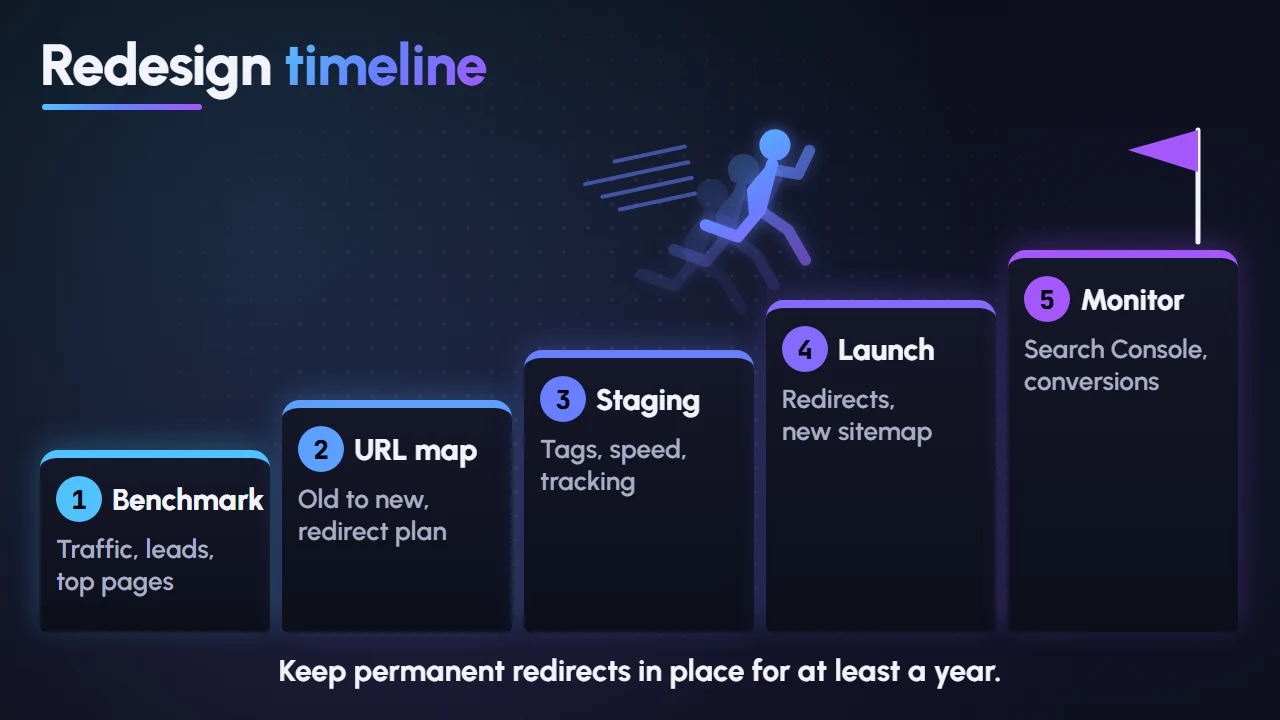
- Keep redirects for at least a year. Google says to keep them "as long as possible, generally at least 1 year", and from a user's perspective, consider keeping them indefinitely.
Also update old redirects from previous redesigns so they point directly to the final new URLs.
Stage 4: Prepare and test the staging site
Build the new site on a staging environment that Google cannot index. Password protection is a reliable way to keep private content out of Google Search (Google Search Central).
If your developers use noindex or a robots.txt block during development, Google advises preparing a list of what must change when the move starts (Google Search Central).
Before launch, check the new site for:
- All mapped content present, with titles, meta descriptions and headings carried over or improved.
- Self-referencing canonical tags using the new URLs. See our guide to canonical URLs.
- Updated hreflang annotations, if you run multilingual pages such as English and Urdu.
- Internal links pointing to new URLs, not old ones that redirect.
- Structured data carried over and valid.
- Analytics, Google Tag Manager and conversion tracking installed and tested.
- Search Console verification method kept (HTML file, meta tag or DNS).
- Mobile layouts, forms and checkout tested on real phones.
- Page speed and Core Web Vitals at least as good as the old site. Our INP guide covers responsiveness, a common weak spot on new, script-heavy builds.
- A new XML sitemap listing only the new, indexable URLs.
Stage 5: Launch day checklist
Launch early in the week and during working hours, so your team is available if something breaks.
- Switch on redirects and test a sample of old URLs, starting with your top landing pages.
- Remove staging blocks: check robots.txt and make sure no
noindextags remain on pages you want indexed. - Test key URLs with the URL Inspection tool in Search Console (Google Search Central).
- Submit the new sitemap in Search Console. Google says this helps it learn about the new URLs. Read more on XML sitemaps.
- Submit a Change of Address only if you moved to a new domain or subdomain. Google says it is not needed for HTTP to HTTPS moves, www changes or path changes on the same domain.
- Check tracking in Google Analytics real-time reports.
- Update external links you control: Google Business Profile, social media profiles and ad campaign landing pages.
Google also notes that after a migration it will crawl your new site more heavily than usual, so make sure your hosting can handle the extra load (Google Search Central).
Stage 6: Monitor after launch
The first few weeks show whether the relaunch is on track. Check these regularly:
- Page indexing report: watch for spikes in "Not found (404)" or other errors.
- Sitemaps report: indexed counts for new URLs should rise over time.
- Performance report: compare clicks and impressions against your benchmark.
- Server logs: look for Googlebot crawling and unexpected error status codes.
- Conversions: enquiries and sales matter more than traffic alone.
Google lists common migration mistakes as leftover noindex or robots.txt blocks, redirects to wrong or non-existent URLs, other crawl errors, insufficient server capacity and sitemaps not updated with new URLs (Google Search Central).
Fix any broken links you find quickly. Also ask sites that link to you most often to update their links to your new URLs, starting with those that send the most visitors.
FAQ
How long does traffic take to recover after a redesign?
Google says medium-sized sites can take a few weeks or more for new URLs to replace old ones, and larger sites take longer. Temporary fluctuation is normal, but a drop lasting beyond that usually points to a technical issue worth investigating.
Do I need redirects if my URLs are not changing?
Not for those URLs. Still check content, internal links, tracking and page speed, because a redesign can change rankings even when URLs stay the same.
Should I redirect deleted pages to the home page?
No. Redirect to a closely related page if one exists. Otherwise return a 404 or 410.
Is it safe to change domain and design at the same time?
Google recommends making big changes one at a time. If you must do both, plan the URL map and redirects carefully and monitor Search Console closely.
Plan your relaunch with confidence
A redesign is a chance to grow, as long as the SEO groundwork comes with it. The work is detailed, but it is far cheaper than rebuilding lost rankings.
Our web development team plans redesigns with URL mapping, redirects, speed testing and post-launch monitoring built in. Start a project and relaunch without losing the traffic you have earned.