- Web Development
How Much Does a Website Cost in Pakistan? The Factors That Decide Your Budget
How much does a website cost in Pakistan? Learn the real cost drivers, from design and CMS to payments, hosting and .pk domains, and how to plan a budget.
 AuthorRehmat Ullah8 min read
Table of Contents
Ask five agencies how much a website costs in Pakistan and you will likely get five very different quotes. One says a few thousand rupees, another asks for several lakh. Both can be honest, because they are pricing very different things.
The question "how much does a website cost in Pakistan?" has no single answer. The price depends on what the site has to do, how it is built, what it connects to and who looks after it once it is live.
This guide breaks down the factors that decide your budget, so you can compare quotes like for like and spend money where it actually brings you customers. We deliberately avoid quoting "average" PKR prices: they go out of date quickly and hide the details that matter.
Why website cost quotes in Pakistan vary so much
Two quotes for "a business website" can describe completely different projects. A low quote often means a pre-made theme, your own content pasted in, and little or no support after launch. A higher quote may include discovery workshops, custom design, copywriting, SEO setup, integrations and a maintenance plan.
Before comparing numbers, compare the scope. Ask every vendor the same questions:
- How many pages and templates are included?
- Is the design custom or based on a purchased theme?
- Who writes the content and supplies the images?
- Which integrations are included (payments, WhatsApp, CRM, courier)?
- What happens after launch: hosting, updates, backups, fixes?
- Who owns the domain, hosting account and source code?
If a vendor cannot answer these clearly, the quote is not really a quote yet.
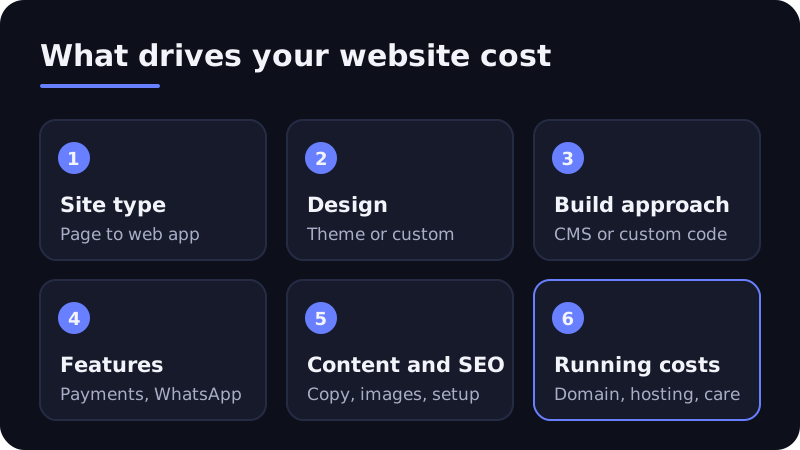
Cost drivers 1 and 2: site type and design
The type of website
The biggest single factor is what kind of site you need. Roughly in order of complexity:
- Landing page: one focused page for a campaign or single service.
- Brochure or company website: a handful of pages such as Home, About, Services, Portfolio and Contact.
- Content or blog-led site: many pages, categories and an editorial workflow.
- E-commerce store: product catalogue, cart, checkout, payments, stock and order management.
- Web application or portal: user accounts, dashboards, bookings, custom logic and data.
Each step up adds pages, templates, testing and risk. A five-page company site and a store with 2,000 products are different projects, even if both are "websites".
Design and user experience
Design ranges from lightly customizing a ready-made theme to designing every screen from scratch.
- Theme-based design is faster and cheaper. It works well when your brand is simple and your pages follow common patterns.
- Custom design starts with wireframes (simple page layouts) and moves to full visual mockups. It costs more because it involves research, revisions and a design system your developers follow.
Also ask whether the design covers mobile layouts properly. Google notes that many customers visit on a mobile device, so "responsive" should mean designed and tested for small screens, not just shrunk.
Cost driver 3: CMS versus custom development
A CMS (content management system) lets you edit pages without code. The choice of platform shapes both the upfront price and your running costs.
| Approach | What you pay for | Good fit |
|---|---|---|
| WordPress | Setup, theme, plugins, customization. The software itself is free and open source under the GPL licence. | Company sites, blogs, many small stores (with WooCommerce) |
| Shopify | Build and theme work, plus a monthly Shopify subscription and app fees | Stores that want hosted e-commerce with less server work |
| Custom build (for example Next.js or Laravel) | Design and development time, plus hosting and ongoing developer support | Portals, unusual workflows, high performance or scale needs |
WordPress is popular for a reason. W3Techs reports it runs about 40% of all websites. Popularity keeps setup costs down, but premium themes, paid plugins and security upkeep still add up.
A custom build usually costs more upfront. In return you get exactly the features you need, without paying for plugin bloat, and you can build unusual logic that off-the-shelf tools cannot handle.
Cost driver 4: features and integrations
Every feature beyond "show information" adds design, development and testing time. Common ones for Pakistani businesses:
Payments
If you want to take payments online, you need a payment gateway. Options include bank gateways, JazzCash's online payment gateway and Easypaisa's online payment gateway. Each requires merchant onboarding and document checks, then technical integration and testing in a sandbox (test environment) before going live.
Two costs to plan for:
- Integration effort: a ready plugin on WooCommerce is quicker than a custom integration on a bespoke site.
- Per-transaction fees: gateways typically charge a percentage per transaction. On Shopify, stores that cannot use Shopify Payments (which is not offered in Pakistan) pay an extra third-party transaction fee on top of the gateway's own fee.
Cash on delivery is still common, so many stores launch with COD plus one digital option and add more later.
Other integrations that affect cost
- WhatsApp chat buttons (simple) or a full WhatsApp Business API setup with automated replies (a bigger job)
- Courier booking and tracking
- CRM or lead forms that push data to Google Sheets, HubSpot or similar
- Booking and appointment systems
- Multilingual pages, such as English and Urdu
- User accounts, loyalty points or member areas
List the features you need at launch and the ones that can wait. A phased launch is one of the simplest ways to control your first budget.
Cost driver 5: content, SEO and launch readiness
Content is the part many owners underestimate. Someone has to write the page copy, take or source photos, and prepare product descriptions.
- Copywriting: professional copy costs extra but usually converts better than text written in a rush the night before launch.
- Images: stock photos, a product shoot or custom graphics each have a different cost.
- SEO setup: page titles, meta descriptions, heading structure, a sitemap, redirects from an old site and Google Search Console setup.
- Analytics and tracking: GA4, conversion tracking and Meta Pixel if you plan to run ads.
Ongoing SEO is a separate service with its own pricing. We explain it in how much it costs to do SEO.
Cost driver 6: domain, hosting, SSL and maintenance
These are the running costs that continue every year after the build.
Domain name
A .com domain is bought through an international registrar. Local extensions such as .pk and .com.pk are managed by PKNIC, which administers the .PK registry. Always register the domain in your business's name, and watch out for domain slamming scams that push fake renewal notices.
Hosting
Hosting options range from shared hosting to VPS, managed WordPress hosting and cloud platforms. Cheaper plans can be slow or unreliable under load. That hurts both sales and search rankings. Shopify includes hosting in its subscription.
SSL certificate
An SSL certificate enables HTTPS, the padlock in the browser. You do not need to pay for a basic one: Let's Encrypt issues free TLS certificates, and most good hosts install them automatically. Read more in what is SSL.
Maintenance
Websites need care after launch: software and plugin updates, backups, security monitoring, uptime checks and small content changes. Budget for this as a monthly or yearly retainer, or agree an hourly rate. A site that nobody maintains becomes a security risk.
Pricing models and how to plan your budget
Common pricing models
Agencies and freelancers in Pakistan usually price website work in one of these ways:
- Fixed price per project: a set price for a defined scope. Good for clear, stable requirements. Changes usually cost extra.
- Package pricing: tiers such as starter, business and e-commerce. Easy to compare, but check exactly what each tier includes.
- Time and materials: you pay for hours or days worked. Suits evolving projects and web apps.
- Retainer: a monthly fee for maintenance, updates, SEO or ongoing improvements.
- Milestone payments: common for larger builds, for example a share at kick-off, design approval and launch.
Whatever the model, get the scope, timeline, number of revisions and handover terms in writing.
Steps to plan your website budget
- Start with the goal. More calls? Online orders? Fewer repetitive enquiries? The goal decides which features matter.
- Write a simple brief. List pages, must-have features, nice-to-haves and examples of sites you like.
- Separate one-time and recurring costs. Build, design and content are one-time. Domain, hosting, subscriptions, apps, gateway fees and maintenance recur.
- Plan a phase two. Launch the core, measure, then add features customers actually ask for.
- Keep ownership. Make sure the domain, hosting and code or admin access belong to your business.
Red flags in a cheap quote
- No written scope or timeline
- Domain registered in the developer's name
- Nulled (pirated) premium themes or plugins, which can hide malware
- No mention of backups, updates or post-launch support
FAQ
Is a website a one-time cost?
No. The build is a one-time cost, but the domain, hosting, SSL (if paid), platform subscriptions, apps and maintenance recur every month or year. Plan for both.
Is WordPress cheaper than a custom website?
Usually at the start, because the software is free and themes speed up the build. Over time, paid plugins, premium themes and security upkeep add costs. A custom build can cost more upfront and less in plugin fees later.
Do I need a .pk domain?
Not necessarily. A .pk or .com.pk domain signals a Pakistani business, while a .com suits brands selling internationally. Many businesses register both and redirect one to the other.
Can I accept JazzCash or Easypaisa on my website?
Yes. Both offer online payment gateways for merchants with a live website. You need merchant approval first, then integration and testing. Budget for development time and per-transaction fees.
Get a clear website quote
A good website quote should answer what you get, what it costs to run and who owns it. If you want an itemized estimate based on your goals, our web development team can scope it with you.
Tell us what the site needs to do and we will map the features, platform and running costs before any build starts. Book a free strategy call or get a quote on WhatsApp.