- AI & Automation
- WhatsApp Marketing
WhatsApp Chatbots for Small Businesses: Use Cases, Setup and Mistakes to Avoid
A practical guide to WhatsApp chatbots for small businesses in Pakistan: real use cases, app vs API, Meta's AI rules, pricing and the setup mistakes to avoid.
 AuthorRehmat Ullah9 min read
Table of Contents
A customer sends "price?" at 11 pm. Another asks whether you deliver to Mardan. A third wants to know if the blue kurta comes in medium. By morning, two of them have bought from someone who replied first.
A WhatsApp chatbot for small business use solves exactly this problem. It answers the repeat questions instantly, collects order or booking details, and passes the conversation to a person when it needs one.
This guide covers where a chatbot actually helps, which WhatsApp product you need, what Meta's rules allow in 2026, how pricing works and the mistakes that cost small businesses customers.
What a WhatsApp chatbot can do for a small business
A chatbot is software that replies to WhatsApp messages automatically. Simple bots follow buttons and menus. AI-powered bots understand free-text questions and answer from information you give them, such as your price list or FAQs.
The best results come from narrow, repetitive jobs. Here are the use cases that work well for Pakistani small businesses:
- Product and price questions. Stock, sizes, colours and prices, pulled from a catalogue or sheet you keep updated.
- Order taking. Collecting name, address, city and payment preference (cash on delivery or bank transfer) in a structured way.
- Order status. "Where is my parcel?" answered with a tracking link instead of a staff member searching courier portals.
- Appointment booking. Clinics, salons, tutors and consultants offering available slots and sending reminders.
- Lead capture. Asking a few qualifying questions before a salesperson calls, so they spend time on serious buyers.
- After-hours cover. Handling late nights, weekends and Eid holidays, then flagging urgent chats for the morning.
A bot is a poor fit for complaints that need judgement, custom price negotiations and anything involving refunds or sensitive account details. Those should go to a person.
WhatsApp Business app vs the Business Platform
Meta offers two different products, and the one you choose decides what kind of chatbot you can run.
| WhatsApp Business app | WhatsApp Business Platform (Cloud API) | |
|---|---|---|
| Best for | Sole traders, small shops | Growing teams, higher volume, real automation |
| Automation | Greeting messages, away messages, quick replies | Full chatbots, AI assistants, integrations |
| Team use | Limited linked devices | Many agents through a shared inbox |
| Connects to your systems | No | Yes: CRM, store, booking system, sheets |
| Cost | Free app | Charged per message (see pricing below) |
The free WhatsApp Business app is a good start. Its greeting and away messages and quick replies cover the basics, but it cannot run a real conversational bot.
A true chatbot needs the WhatsApp Business Platform, accessed through Meta's Cloud API. You connect it to chatbot software, either through a Business Solution Provider (BSP, a Meta partner that sells ready-made tools) or through a custom build. Our WhatsApp Business API guide for Pakistani businesses explains that setup in detail.
If you already have customers on the Business app, ask your provider about coexistence. Meta's documentation describes how an existing Business app number can connect to Cloud API while you keep using the app, with some app features, such as broadcast lists, becoming limited.
Meta's rules on AI chatbots in 2026
This is where many businesses get confused, so here is the short version.
In October 2025, Meta updated its WhatsApp Business Solution Terms to prohibit AI providers from using the platform when a large language model or general-purpose AI assistant is the primary thing being offered. The rule applied to new users immediately and to existing ones from 15 January 2026.
The terms were revised again in March 2026 and now carve out users with European Economic Area and Brazil country codes, after regulatory pressure in those regions. The European Commission has also ordered Meta to restore access for rival AI assistants in the EU while it investigates. For numbers in Pakistan, the general restriction still applies as of the terms we checked.
What this means for you:
- Allowed: an AI bot that answers questions about your products, takes orders, books appointments or supports your customers. AI is a tool inside your business service.
- Not allowed: an open-ended "ask me anything" assistant where the AI itself is the product.
WhatsApp's Business Messaging Policy adds one more rule that matters for every bot: when you use automation, you must offer "prompt, clear, and direct escalation paths" to a human.
How WhatsApp chatbot pricing works
Meta moved the Business Platform to per-message pricing on 1 July 2025. A few ideas explain most of your bill.
The 24-hour customer service window
When a customer messages you, a 24-hour customer service window opens. Your bot can reply with normal messages during that window. Outside it, you can only start a conversation with an approved template message (a pre-approved message format).
Template categories
Templates are charged by category (marketing, utility or authentication) and by the recipient's country code. Marketing templates are always charged.
Change on 1 October 2026
Meta has announced that from 1 October 2026 it will start charging for service messages, which are free-form replies inside the customer service window, including replies written by a third-party AI bot. Utility templates sent inside the window will also be charged.
The 72-hour free entry point window, which opens when a customer arrives from a Click to WhatsApp ad and you reply within 24 hours, stays free for message delivery.
For a chatbot, this changes the design brief. A bot that sends five short bubbles costs more than one that sends a single clear answer with buttons.
How to set up a WhatsApp chatbot, step by step
- List your top 20 questions. Read your last month of chats. You will usually see the same few questions again and again.
- Pick three jobs for version one. For example: prices, order taking and delivery areas. Resist building everything at once.
- Choose your route. A BSP chatbot builder suits simple menu bots. A custom build suits bots that must check real stock, orders or appointment slots.
- Set up your Meta business portfolio and number. Complete business verification and choose a display name that matches your brand.
- Write the knowledge base. Prices, delivery charges, return policy, timings and locations, written plainly. An AI bot is only as accurate as this document.
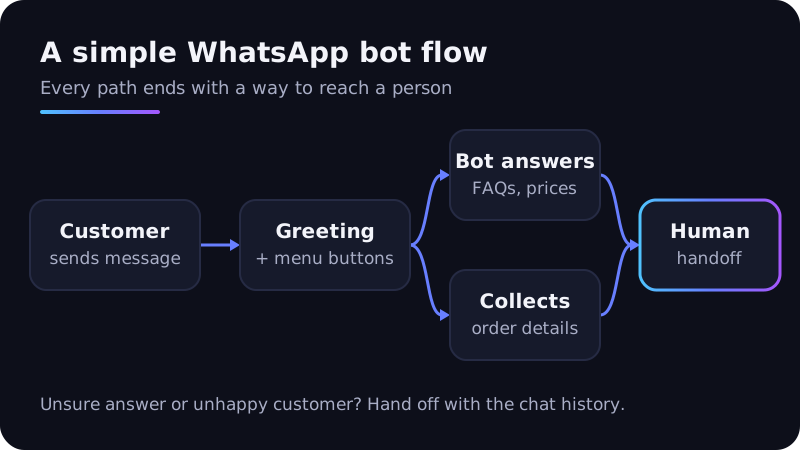
- Design the conversation. Short greeting, a menu of buttons, answers in one or two messages, and a "Talk to a person" option on every path.
- Collect opt-in. WhatsApp requires opt-in before you message people, stating your business name clearly.
- Test with real staff and a few customers. Try Roman Urdu, spelling mistakes and voice notes. Fix what breaks.
- Launch and review weekly. Read the chats the bot handed off and add those answers to the knowledge base.
Mistakes to avoid
These are common problems when small businesses launch their first bot.
No way to reach a human
A bot that loops customers through menus loses sales and breaks WhatsApp's policy. Add a handoff button and route those chats to a person with the conversation history attached.
Ignoring Roman Urdu and mixed language
Many Pakistani customers type "kitne ka hai" or mix English and Urdu in one message. Test your bot against how your customers actually write, not textbook English.
Letting AI guess prices or policies
An AI bot that is not grounded in your real price list may invent a discount or delivery time. Keep the bot tied to your approved information and tell it to hand off when unsure.
Asking for sensitive data
WhatsApp's policy says not to ask for full payment card numbers, financial account numbers or personal ID card numbers. Send payment links from a proper gateway instead.
Blasting promotions to everyone
Your bot's contact list is not a marketing list. Messaging people who never opted in leads to blocks and reports, which lowers your quality rating and can restrict your number.
Set and forget
Prices change, stock runs out, and delivery areas grow. A bot with last season's information does more harm than no bot. Assign one person to update it.
How to measure whether your chatbot is working
Track a few numbers from week one:
- First response time: should drop to seconds for questions the bot handles.
- Resolution rate: the share of chats the bot completes without a person.
- Handoff rate and reasons: a guide to what the bot should learn next.
- Orders or bookings from WhatsApp: tie these back to the channel, not just message counts.
- Cost per resolved chat: more important once service messages are charged from October 2026.
- Blocks and reports: an early warning sign that messages feel like spam.
If you run ads that send people to WhatsApp, connect these numbers to your wider lead generation tracking so you can see which campaigns bring real buyers.
Frequently asked questions
Can I build a chatbot on the free WhatsApp Business app?
Not a full one. The app offers greeting messages, away messages and quick replies. A conversational bot needs the WhatsApp Business Platform through Cloud API.
Is it allowed to use ChatGPT-style AI in my WhatsApp bot?
Yes, when the AI serves a clear business purpose, such as support, orders or bookings. Meta's terms restrict general-purpose AI assistants where the AI itself is the main product.
Will a chatbot replace my sales staff?
It should not. A good bot handles repeat questions and collects details, so your team spends time on customers ready to buy and on problems that need judgement.
How much does a WhatsApp chatbot cost in Pakistan?
It depends on three parts: Meta's per-message charges, any BSP subscription, and the build itself. A menu bot on a BSP costs far less to set up than an AI bot connected to your store or booking system. Message volume and how many languages you support also affect the total.
Get a WhatsApp chatbot built for your business
A focused WhatsApp chatbot helps a small business reply in seconds, capture more orders and free staff from typing the same answers all day. The rules and pricing changed a lot in 2025 and 2026, so it pays to design the bot around them from the start.
Softhat builds WhatsApp bots and AI automations for Pakistani businesses, from simple order bots to AI assistants connected to your systems. Book a free strategy call or get a quote on WhatsApp, and we will map your first three bot jobs with you.