- Google Ads & PPC
Google Ads for Beginners: How Pakistani Businesses Can Start Without Wasting Budget
Google Ads for beginners in Pakistan: set up tracking, pick the right campaign, keywords and bidding, and avoid the mistakes that waste your first budget.
 AuthorRehmat Ullah8 min read
Table of Contents
Most first Google Ads accounts in Pakistan don't fail because ads "don't work". They fail because the money goes to the wrong searches, in the wrong cities, with no way to tell which clicks became customers.
This Google Ads for beginners guide fixes that. It walks you through the setup decisions that protect your budget: tracking, campaign type, location, keywords, bidding and billing. Do these well and your first PKR 50,000 teaches you something useful instead of disappearing.
If you are new to paid search altogether, start with our explainer on what PPC advertising is, then come back here.
Before you spend a rupee: three things to decide
Google Ads rewards clarity. Before you open the account, write down answers to three questions.
- What counts as a result? A phone call, a WhatsApp message, a form submission or an online order. Pick one main action.
- Where are your customers? A clinic in Mardan and an online store shipping nationwide need very different location settings.
- What can you afford per customer? If a new client is worth PKR 30,000 in profit, you can pay more per lead than a shop selling PKR 1,500 products.
These answers shape every setting that follows. They also tell you when to stop a campaign that isn't paying back.
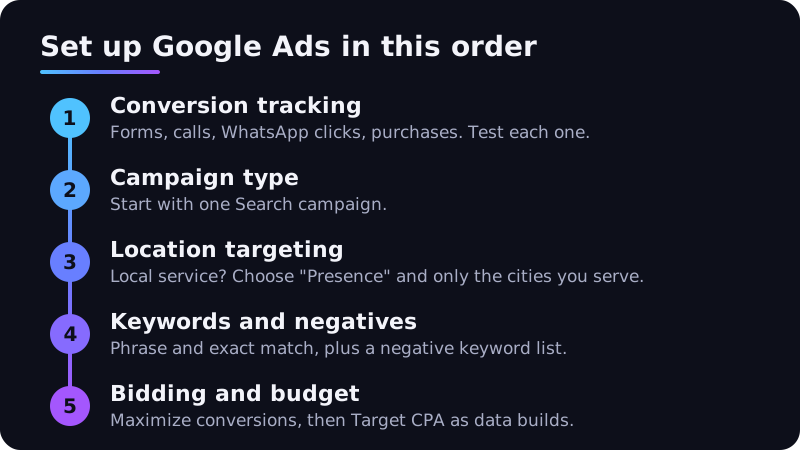
Set up conversion tracking first
A conversion is the action you want people to take after clicking your ad. Google Ads can measure website actions, app activity, phone calls and offline conversions imported from your sales records.
Without tracking, you can only see clicks. That is like judging a salesperson by how many people walked past the shop.
What to track for a typical Pakistani SME
- Form submissions: fire the conversion on the thank-you page, not the form page.
- Calls from ads: use call assets so taps on your number are counted.
- WhatsApp clicks: track clicks on your wa.me link as a conversion event. Many customers prefer to message before they buy.
- Purchases: for online stores, pass the order value so you can see revenue, not just orders.
Google's own guidance is to add the Google tag to your site and check it with Tag Assistant before you expect data to appear. Test every conversion yourself once before launch.
Choose the right campaign type for your first campaign
Google offers several campaign types. Its help centre lists Performance Max, Search, Display, Video, App and Shopping as the main options, each suited to a different goal.
| Campaign type | Where ads show | Good first choice when |
|---|---|---|
| Search | Text ads on Google search results | People already search for what you sell ("AC repair Lahore") |
| Performance Max | Across Google inventory from one campaign | You have solid conversion tracking and creative assets |
| Shopping | Product listings with image and price | You run an online store with a product feed |
| Video | YouTube and video partner sites | You want awareness and have video content |
| Display | Websites and apps across the web | You want reach or remarketing, not first leads |
For most beginners, start with a Search campaign. You see exactly which searches triggered your ads. You control keywords and ad text. And the intent is high: people are already looking.
Performance Max is powerful, but it relies heavily on conversion data. Without clean tracking it has little to learn from.
You may also see a setting called AI Max for Search campaigns, which expands matching beyond your keywords and generates text. Leave it off until you understand your search terms report, then test it deliberately.
Location targeting: the setting that quietly drains budgets
Under location options, Google offers two choices. Presence or interest reaches people in your area and people who have shown interest in it. Presence reaches only people who are in, or regularly in, your chosen locations. Google recommends Presence or interest for most advertisers.
That default suits travel, education or real estate, where someone in Dubai may be planning to buy in Islamabad. It does not suit a home-service business that can only reach customers in Peshawar or Faisalabad.
A simple rule:
- Local services (repairs, clinics, salons, tuition): choose Presence and target only the cities or radius you serve.
- Nationwide delivery: target Pakistan and review location reports monthly.
- Overseas Pakistani audience (property, education, gifts): keep Presence or interest and build separate campaigns by country.
Also set your language and ad schedule to match when your team can actually answer calls. A lead that rings at 11 pm with nobody to pick up is a wasted click.
Keywords and match types, explained simply
Keywords tell Google which searches your ad may appear on. Match types control how loosely Google interprets them. According to Google Ads Help:
| Match type | How you write it | What it matches |
|---|---|---|
| Broad match | web design company | Searches related to your keyword, even without its exact words |
| Phrase match | "web design company" | Searches that include the meaning of your keyword |
| Exact match | [web design company] | Searches with the same meaning or intent |
For a small first budget, begin with phrase and exact match on 10 to 20 tightly related keywords. Broad match can work well later, when Smart Bidding has conversion data to guide it.
Add negative keywords from day one
Negative keywords stop your ads showing on irrelevant searches. Common ones for Pakistani service businesses: "free", "jobs", "course", "PDF", "salary" and "OLX".
One detail beginners miss: negative keywords don't match close variants, so add singular and plural forms and obvious synonyms yourself.
Bidding and budget for a first campaign
Your bidding strategy tells Google what to optimize for. Google groups strategies by goal: conversions, clicks, visibility and video views.
A practical path for beginners:
- Weeks 1 to 3: use Maximize clicks with a sensible cap, or Maximize conversions if tracking is already verified. Watch search terms closely.
- Once conversions start flowing: stay on Maximize conversions, so Google bids for leads rather than traffic.
- When results are stable: add a Target CPA (target cost per acquisition). Google says you can start with no conversion history, but recommends judging results over at least 30 days and 30 conversions.
On budget, know how daily limits behave. Google may spend up to twice your average daily budget on a busy day, but you won't pay more than 30.4 times your daily budget in a month. So a PKR 2,000 daily budget means a monthly ceiling of about PKR 60,800.
Pick a daily budget you can hold for at least a month. Short, stop-start bursts make results hard to read.
Account essentials in Pakistan: verification, billing and tax
Advertiser verification
Google is rolling out advertiser verification to all advertisers. If your account is selected, you may be asked for business and identity details, and ads can be paused if you miss the deadline. Keep your registered business name, NTN documents and CNIC details consistent with your payments profile.
Payment settings
Google offers automatic payments (charged after ads run), manual payments (you pay in advance) and monthly invoicing for eligible businesses. Which options you get depends on your billing country and currency. Check what your account offers under Billing before you choose, and use Google's payment options finder for Pakistan-specific methods.
Taxes
Google's tax page for Pakistan changed in 2026. For accounts on monthly invoicing, invoices are issued by Google Pakistan (Private) Limited from 1 October 2026, and those sales carry a 15% Sindh Sales Tax. Accounts on automatic or manual payments with Pakistani addresses remain contracted with Google Asia Pacific, according to the same page.
Your bank may also apply its own charges or taxes to card payments in foreign currency. Tax rules change often, so confirm the current position with your accountant and in your Google Ads billing settings.
Common beginner mistakes and key takeaways
Mistakes to avoid
- Sending ads to the homepage. Use a landing page that matches the search, with a clear WhatsApp or call button.
- Ignoring the search terms report. Check it at least weekly for the first month.
- Changing settings every day. Automated bidding needs time to learn. Make one change, then wait.
- No mobile check. Many visitors will arrive on phones. Test your page on a mid-range Android.
- Chasing clicks. A low cost per click means little if nobody calls. Judge campaigns on cost per lead or sale.
Paid and organic search work best together. See SEO vs SEM for how to balance both.
Key takeaways
- Set up and test conversion tracking before launching anything.
- Start with one Search campaign, phrase and exact match keywords, and a negative keyword list.
- Choose Presence location targeting if you only serve certain cities.
- Move to Maximize conversions, then Target CPA, as conversion data builds.
- Check verification, payment settings and tax treatment for your Pakistani account in the billing section.
- Measure success by cost per lead or sale, not cost per click.
Get your first campaign right
A good first month builds data you can grow on. A bad one burns budget and confidence.
Softhat's Google Ads team sets up tracking, campaign structure and reporting for businesses across Pakistan, from KPK to Karachi. Book a free strategy call and we'll review your plan before you spend.