

- Content Writing
- Social Media Marketing
How to Build a Social Media Content Calendar That You'll Actually Follow
Build a social media content calendar you'll stick to: set goals, choose content pillars, plan around Pakistani dates, batch content and schedule posts.
 AuthorRehmat Ullah7 min read

Table of Contents
Most businesses start social media with energy. Three posts in the first week, two the next, then silence until someone remembers on a Friday night that "we haven't posted in a while".
The problem is rarely a lack of ideas. It is the lack of a simple system that decides what to post, when, and who does the work.
A social media content calendar is that system. Done well, it saves hours every week, keeps your brand visible during busy seasons like Ramadan and 11.11, and makes results easier to measure. This guide shows you how to build one that a small Pakistani team can actually keep up with.
What a social media content calendar is, and why most fail
A content calendar is a shared plan of upcoming posts. For each post it records the date, platform, format, topic, caption, visual and status.
The audience is there. DataReportal estimates Pakistan had 79.9 million social media user identities in October 2025 (DataReportal). The challenge is showing up for them consistently.
Calendars usually get abandoned for predictable reasons:
- Too ambitious: planning daily posts on five platforms with one part-time person.
- Too detailed too early: writing every caption for three months, then everything changes.
- No owner: nobody is responsible for approvals, so posts sit in "draft".
- No link to goals: posts feel like busywork because nobody checks what worked.
The steps below are designed to avoid all four.
Step 1: Set goals and a realistic posting rhythm
Start with what social media should do for your business in the next quarter. Pick one or two goals, such as more WhatsApp enquiries, store visits, online orders or job applications.
Then be honest about capacity. A consistent schedule you can sustain beats an ambitious one you drop after a month.
| Team setup | A sustainable starting point |
|---|---|
| Owner doing it alone | 2 to 3 posts a week on one or two platforms |
| One marketing person | 3 to 5 posts a week plus stories on two or three platforms |
| Small team or agency | Daily stories, 4 to 7 feed posts or videos a week across key platforms |
These are practical starting points, not platform rules. Adjust after a month based on what your team can deliver at good quality.
Choose platforms based on where your customers are. A B2B software company may focus on LinkedIn, while a fashion brand leans on Instagram and TikTok.
Step 2: Define three to five content pillars
Content pillars are the recurring themes your brand posts about. They stop you from staring at a blank calendar, and they keep your feed balanced between selling and being useful.
Example pillars for a home bakery in Islamabad:
| Pillar | Purpose | Post ideas |
|---|---|---|
| Behind the scenes | Build trust | Morning prep, packing orders, meet the baker |
| Products and offers | Drive orders | New flavours, festive boxes, delivery areas |
| Customer stories | Social proof | Reposted birthday photos (with permission), reviews |
| Tips and education | Add value | How to store cakes, choosing a wedding cake size |
| Community and culture | Relate | Eid, Independence Day, local events |
Tie each pillar to a goal and to your audience. If you haven't defined your ideal customers yet, start with buyer personas. Also decide your language mix: English, Urdu or Roman Urdu. Our guide to Urdu and Roman Urdu content covers when each works best.
Step 3: Map the year around key Pakistani dates
Before planning individual posts, block out the moments that matter for your industry. Campaigns for these need visuals, offers and ads prepared weeks in advance.
| Period | Planning notes |
|---|---|
| Ramadan and Eid ul Fitr | Ramadan 2027 is expected to begin around 8 February 2027, subject to moon sighting (IslamicFinder). Plan Sehri and Iftar timing content, Eid collections and gift ideas |
| Pakistan Day (23 March) | Patriotic content, respectful tone, avoid forced sales tie-ins |
| Eid ul Adha | Lunar date moves about 11 days earlier each year; confirm closer to the time |
| Independence Day (14 August) | Green and white campaigns, customer stories, local pride |
| Back to school and wedding seasons | Relevant for retail, clothing, events, photography and gifts |
| 11.11 and November sales | Major e-commerce sale period; prepare offers, stock and customer support |
| Quaid-e-Azam Day and year end (25 December) | Year-in-review posts, thank-you messages, next year's plans |
Add industry dates too: exam results for education providers, budget announcements for finance firms, or summer heat for AC and solar companies. Leave room for trends and news you can't predict.
Step 4: Choose a calendar tool and the right fields
You don't need expensive software to start. A shared Google Sheet or Notion board works well for most small teams. Meta Business Suite also includes a calendar view where you can plan and schedule Facebook and Instagram posts (Meta Business Help Center).
Whatever tool you use, include these fields:
- Publish date and time
- Platform (Instagram, Facebook, TikTok, LinkedIn, YouTube, WhatsApp Channel)
- Pillar
- Format (Reel, carousel, static image, story, text post, live)
- Topic or hook
- Caption and hashtags
- Call to action, such as "Order on WhatsApp" or "Book a visit"
- Asset link to the design or video file
- Owner responsible for creating it
- Status: idea, in production, awaiting approval, scheduled, published
- Link with UTM tags so you can track visits in Google Analytics
- Result notes after publishing
Keep it simple. If a field is never used after a month, delete it.
Step 5: Build a weekly workflow and batch your content
A calendar only works with a routine behind it. Batching means doing similar tasks together, such as filming five videos in one session instead of one each day.
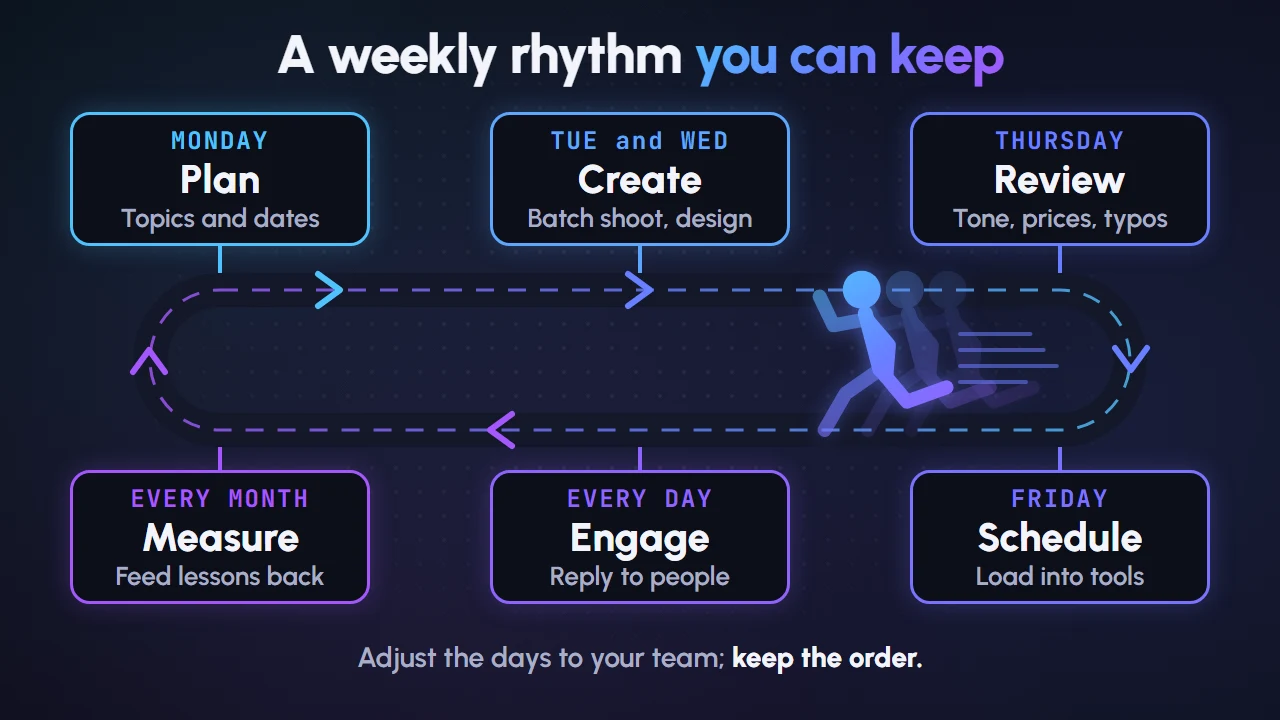
A sample week for a small team:
- Monday, plan (30 to 60 minutes): confirm next week's topics, check upcoming dates and trends.
- Tuesday and Wednesday, create: write captions, design graphics, shoot and edit videos in batches.
- Thursday, review: one person checks spelling, brand tone, prices and offer terms.
- Friday, schedule: load approved posts into your scheduling tool.
- Daily, engage (15 to 20 minutes): reply to comments and messages, and share stories.
For short-form video, plan hooks and shot lists in the calendar, not just captions. Our guide to Instagram Reels strategy covers formats in more detail.
Step 6: Schedule posts, but don't disappear
Scheduling tools publish posts on time even when your team is busy. Most major platforms offer native scheduling:
- Facebook and Instagram: create and schedule posts and stories in Meta Business Suite (Meta Business Help Center).
- LinkedIn: schedule posts from an hour to three months in advance (LinkedIn Help).
- TikTok: Business and Creator accounts can schedule videos from TikTok's web tools; check the current scheduling window in your account, as it has changed over time.
Third-party tools can manage several platforms in one place. Choose one that supports all the platforms and formats you actually use.
Scheduling is not the same as automating your presence. Comments and DMs still need a human reply, especially enquiries about price, delivery or availability. If you use WhatsApp for sales, link your calendar to your WhatsApp marketing campaigns so offers match across channels.
Step 7: Review monthly and improve
Set a recurring monthly review of 60 minutes. Look at each pillar and format, not just individual posts.
Questions to answer:
- Which posts led to enquiries, orders or website visits, not just likes?
- Which pillar and format performed best on each platform?
- Did we publish what we planned? If not, why?
- What should we do more of, less of, or stop next month?
Use platform insights, Meta Business Suite and GA4 reports for the numbers. Record the lessons in your calendar so next month's plan improves. For a deeper check, run a full social media audit once or twice a year.
Key takeaways and next steps
- Start from business goals and a posting rhythm your team can sustain.
- Use three to five content pillars to balance selling with value.
- Block out Ramadan, Eid, national days and sale seasons weeks in advance.
- Keep the calendar simple: date, platform, pillar, format, caption, owner, status.
- Batch content creation and schedule it, but reply to people daily.
- Review monthly and plan the next month based on results, not guesses.
A social media content calendar turns posting from a daily scramble into a predictable process. Build it once, keep it simple, and let the monthly reviews make it smarter over time.
If you'd rather hand over the planning, content creation and reporting, our social media marketing services cover strategy, calendars, design, video and community management for brands across Pakistan. Get a quote on WhatsApp or book a free strategy call to start.