
- E-commerce
- SEO
SEO for E-commerce Stores: Category Pages, Products and Technical Fixes
SEO for e-commerce stores in Pakistan: structure category and product pages, control filters and duplicates, add product schema and handle out-of-stock items.
 AuthorRehmat Ullah8 min read
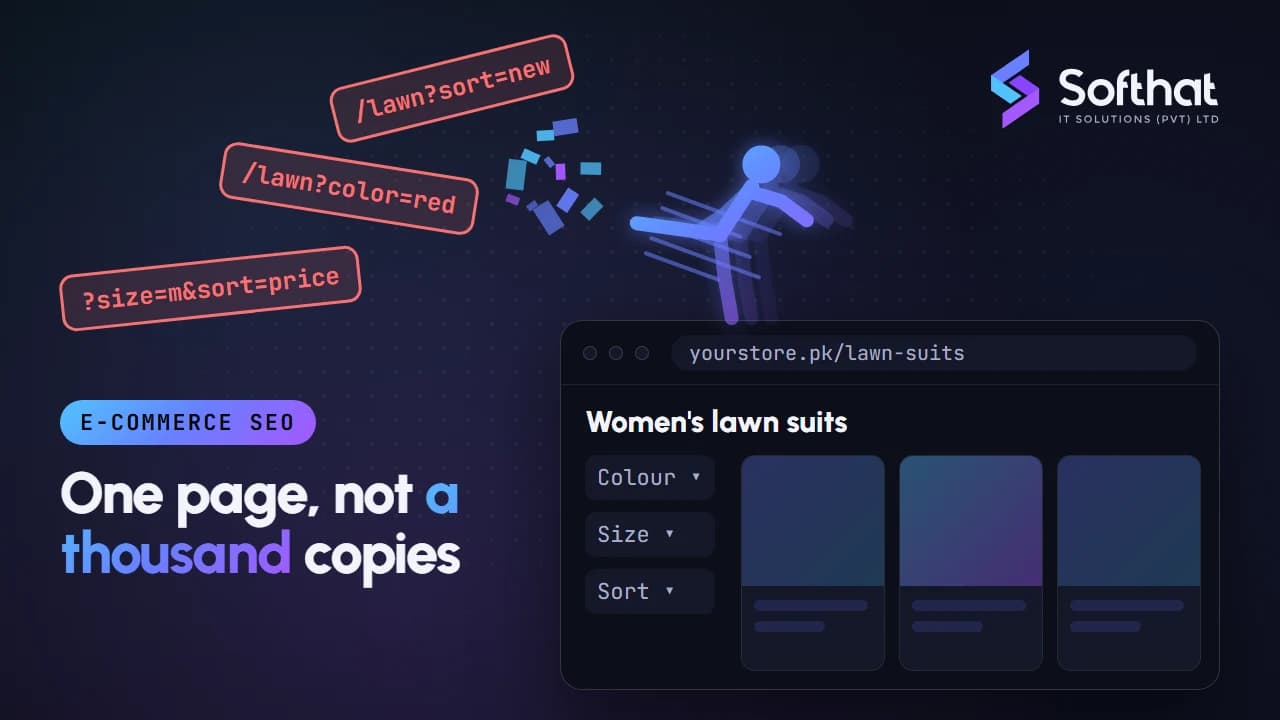
Table of Contents
Running an online store in Pakistan often means paying for every visitor. Meta ads, Google Shopping and influencer posts all cost money, and costs tend to climb around 11.11, Ramadan and Eid sales.
Organic search is different. A category page that ranks for "women's lawn suits" or "gaming laptops in Pakistan" can bring buyers every day without a click cost.
But SEO for e-commerce stores has its own problems. Thousands of product URLs, filters that create endless duplicate pages, and items that go out of stock every week can all hold a store back. This guide walks through the fixes that matter most, based on Google's own e-commerce documentation.
Why e-commerce SEO needs its own approach
A service business website might have 30 pages. An online store can easily have 3,000 products, plus categories, brands, filters and sort options that multiply into hundreds of thousands of URLs.
That creates three challenges most other sites don't face:
- Crawling: Google has to find the pages that matter among many that don't.
- Duplication: the same product can appear under several URLs.
- Change: prices, stock and variants change constantly.
Google notes that faceted navigation is "by far the most common source of overcrawl issues" site owners report (Google Search Central Blog). If your platform choice is still open, our comparison of WordPress vs Shopify vs a custom website covers how much control each gives you over these issues.
Build a site structure search engines can follow
Google uses your internal links to understand which pages are important. Its e-commerce guidance recommends linking "from menus to category pages, from category pages to sub-category pages, and finally from sub-category pages to all product pages" (Google Search Central).
Practical rules for your store:
- Keep a clear hierarchy, such as Home > Men > Shoes > Sneakers.
- Use normal
<a href>links for menus and filters you want crawled. Google warns that navigation built only with JavaScript click events may not be followed. - Link to best sellers and seasonal collections from the homepage. Google says the more internal links a page has, the more important it looks relative to your other pages.
- Add breadcrumbs on category and product pages.
- Submit an XML sitemap for products and categories, because Googlebot does not type queries into your search box to discover products.
Use clean, descriptive URLs
Google suggests adding descriptive words to URL paths and using ?key=value parameters rather than bare values (Google Search Central).
| Weaker | Better |
|---|---|
/p?id=88213 |
/product/black-leather-chelsea-boots |
/shoes?black |
/shoes?color=black |
/product/kurta#blue |
/product/kurta?color=blue |
Avoid # fragments for different content. Google says it does not use fragment identifiers in indexing, so /t-shirt#black and /t-shirt#white count as the same page.
Optimize category pages first
Category pages usually target your highest-volume keywords, such as "men's watches" or "baby diapers online". They deserve more attention than they usually get.
- Title and H1: match how people search, for example "Men's Watches: Analog, Digital and Smart Watches".
- Short intro copy: two to four sentences above the products explaining the range, plus a longer buying guide or FAQ below the grid.
- Useful sub-category links: link to popular sub-categories like "smart watches under PKR 10,000" only if you maintain those pages properly.
- Pagination: give each page its own URL, such as
?page=2, and link pages with normal links. Google advises: "Don't use the first page of a paginated sequence as the canonical page" (Google Search Central). - Infinite scroll or "load more": make sure paginated URLs still exist behind it, or use sitemaps and product feeds so every item is discoverable.
Make product pages worth ranking
Many Pakistani stores copy manufacturer or supplier descriptions word for word. When dozens of sellers use the same text, there is little reason for Google to prefer your page.
A strong product page includes:
- a unique title with brand, model and key attribute (size, colour, capacity)
- an original description that answers buyer questions: fabric, sizing, warranty, what's in the box
- several clear images with descriptive alt text
- price, availability, delivery time and return policy visible on the page
- genuine customer reviews and Q&A, where your platform supports them
- links to related products and the parent category
Handle variants carefully
For products that come in several colours or sizes, Google recommends distinct URLs for variants, using a path such as /t-shirt/green or a parameter such as /t-shirt?color=green (Google Search Central). Keep the version without optional parameters as the main canonical URL.
Control faceted navigation and duplicate content
Filters for size, colour, price and brand are great for shoppers. Left unmanaged, they create near-infinite URL combinations. Read what duplicate content is for the background.
Google's faceted navigation guidance offers two main paths. Here is how they apply to common store situations:
| If you... | Then |
|---|---|
| Don't need filter URLs in search | Block crawling of filter parameters with robots.txt, or use URL fragments for filters |
| Want some filter pages indexed (e.g. "Nike running shoes") | Use standard & parameters, keep filter order consistent, and return a 404 when a combination has no results |
| Have sort orders like price low to high | Avoid making sort options crawlable links; point rel="canonical" to the unsorted page |
| List one product under several categories | Use one product URL everywhere, in links, sitemaps and canonical tags |
Google says rel="canonical" on faceted URLs "may, over time, decrease the crawl volume of non-canonical versions", but it is a hint, not a block. Our guide to canonical URLs explains the difference.
Choose a small set of valuable filter combinations to index, give them proper titles and intro text, and treat them like real category pages. Keep the rest out of the crawl.
Add product structured data and a Merchant Center feed
Structured data (code that describes your product in a machine-readable way) helps Google show price, availability and ratings in results.
For stores where customers can buy directly, use merchant listing markup. Required properties are name, image and offers with price and priceCurrency (PKR for Pakistani rupee prices). Recommended ones include availability, shippingDetails, hasMerchantReturnPolicy, product identifiers like gtin, and aggregateRating (Google Search Central).
A few rules to follow:
- Merchant listings require a price greater than zero and a single
Offer, because you must be the seller. - Google recommends putting a store-wide return policy under your Organization markup instead of repeating it on every product.
- Make sure the markup matches what shoppers see on the page.
Google also recommends doing both: adding structured data and uploading products to Google Merchant Center, since "web crawling is not guaranteed to find all products on your site" (Google Search Central). Check Merchant Center's supported countries for the markets you sell to before planning free listings or Shopping campaigns.
Handle out-of-stock and discontinued products
Stock changes are where many stores lose rankings they spent months building. Deleting a page the moment an item sells out throws away its links and history.
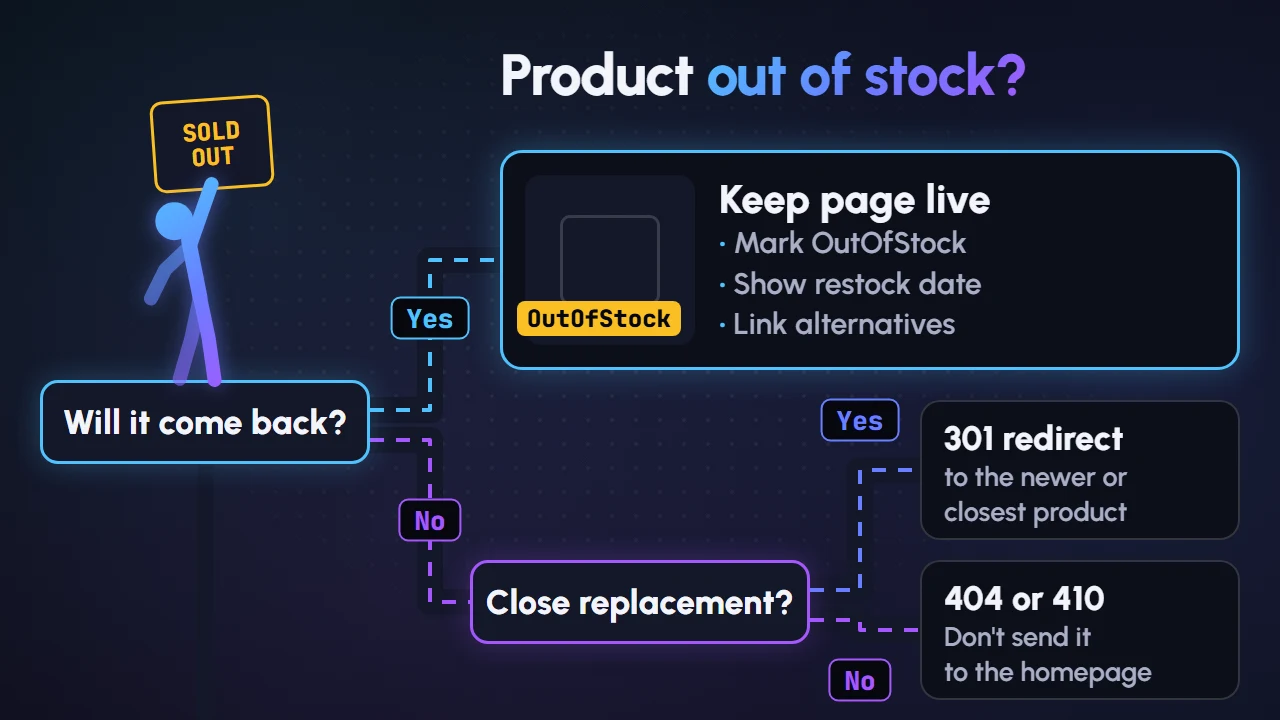
- Temporarily out of stock: keep the page live, set
availabilitytoOutOfStock, show a restock date or "notify me" option and link to alternatives. Google's launch guide confirms you can publish products marked out of stock and still have them indexed (Google Search Central). - Permanently discontinued, close replacement exists: 301 redirect to the newer model or the most relevant product.
- Permanently discontinued, no replacement: return a 404 or 410. Google removes indexed URLs that return a 4xx code (Google Search Central). Avoid redirecting everything to the homepage, which frustrates shoppers.
- Empty categories: if a category is removed from your navigation, Google suggests considering a 404 for it.
Improve speed and Core Web Vitals
Product grids, large images, review widgets, chat plugins and tracking scripts can make stores slow, especially on mid-range Android phones and mobile data.
Google's Core Web Vitals targets are (Google Search Central):
| Metric | What it measures | Good |
|---|---|---|
| Largest Contentful Paint (LCP) | Loading | 2.5 seconds or less |
| Interaction to Next Paint (INP) | Responsiveness | Under 200 milliseconds |
| Cumulative Layout Shift (CLS) | Visual stability | Under 0.1 |
Quick wins for stores: serve images in WebP or AVIF at the right size, lazy-load images below the fold, reserve space for banners and images to prevent layout shifts, and remove apps or plugins you no longer use. For responsiveness fixes, see our INP guide.
Frequently asked questions
Should I write unique descriptions for thousands of products?
Start with the products and categories that bring the most revenue or search demand. Rewrite those first, then work through the rest in batches. Templates that add real specifications help, but avoid thin, auto-generated text.
Should I noindex filter pages?
A noindex tag keeps pages out of results, but Google still has to crawl them to see the tag. If filters create huge numbers of URLs, blocking them in robots.txt saves more crawling. Only do that for filters you are sure you don't want indexed.
Is marketplace selling enough, or do I need my own store's SEO?
Marketplaces bring traffic, but you compete with other sellers on the same platform. Your own store builds a brand asset and customer data you control. Many businesses do both.
How long does e-commerce SEO take?
Technical fixes can show impact within weeks once pages are recrawled. Category and content improvements usually take several months.
Grow your store's organic sales
Good SEO for e-commerce stores comes down to three things: a structure Google can crawl, category and product pages that deserve to rank, and technical hygiene around filters, stock and speed.
If you want help auditing your store or planning category content, our SEO services cover e-commerce sites on Shopify, WooCommerce and custom builds. Book a free strategy call and we'll show you the fixes with the biggest potential for your store.